Blog · October 15, 2026 · Author
AI Agents for Shopify Stores: 7 Ways to Automate Your Marketing
Last updated: October 13, 2026 · By Rob Gelhausen, Founder, Reach Them AI
Running a Shopify store means doing ten jobs at once. You write product pages, chase abandoned carts, tweak ads and fix the catalog, usually at 11 p.m. A Shopify AI agent can take a good chunk of that off your plate. Not all of it, though. This guide covers seven marketing tasks worth handing over, and the ones you should keep.
What is a Shopify AI agent? A Shopify AI agent is software that connects to your store's data, decides what to do next and then takes action, like drafting a product description, launching an ad or updating inventory. Unlike a chatbot, it doesn't just answer questions. It works through multi-step tasks, ideally with you approving anything that goes live.
Key takeaways
- Agents act on your store. Chatbots mostly talk.
- Product copy, cart recovery and ad management are the easiest wins.
- Keep a human approval step on anything customers or ad budgets touch.
- Start with one workflow, measure it and then expand.
How is an AI agent different from a chatbot or Shopify Flow?
The short answer: an agent plans and acts across tools, while a chatbot replies and Flow follows fixed rules.
Shopify already gives merchants some built-in options. Sidekick, its admin assistant, can answer questions about your business and take actions inside your admin, and it's included with Shopify plans (Shopify, accessed October 2026). Shopify Flow handles rule-based automation (if this, then that). Both are useful. But your marketing doesn't live only inside Shopify. It lives in Google Ads, Meta, your email tool and your call tracking too.
| Chatbot | Rule-based automation (e.g. Flow) | AI agent | |
|---|---|---|---|
| What it does | Answers questions | Runs a fixed trigger-action rule | Plans and completes multi-step tasks |
| Handles new situations? | Within a script or model | No, only what you set up | Yes, within the limits you give it |
| Works across tools | Rarely | Through connectors you configure | Built to, via integrations |
| Best for | Shopper FAQs | Tagging, routing, alerts | Copy, campaigns, reporting, catalog work |
So which do you need? Often all three. They just do different jobs.
7 ways to automate Shopify marketing with AI agents
1. Product descriptions that don't sound copied
Writing 200 product pages by hand is miserable. An agent can pull specs, materials and sizing from your catalog and draft a description for each product in your brand voice. You review, edit and approve. The time savings come from skipping the blank page, not from skipping the review.
A tip: give the agent two or three of your best existing descriptions as examples. It'll match your tone far better than with a generic prompt. Then run the drafts through a humanizer pass so they don't read like every other AI-written page. We use the open-source humanizer agent skill, which strips common AI writing tells like stock phrases, forced lists of three and empty closing lines.
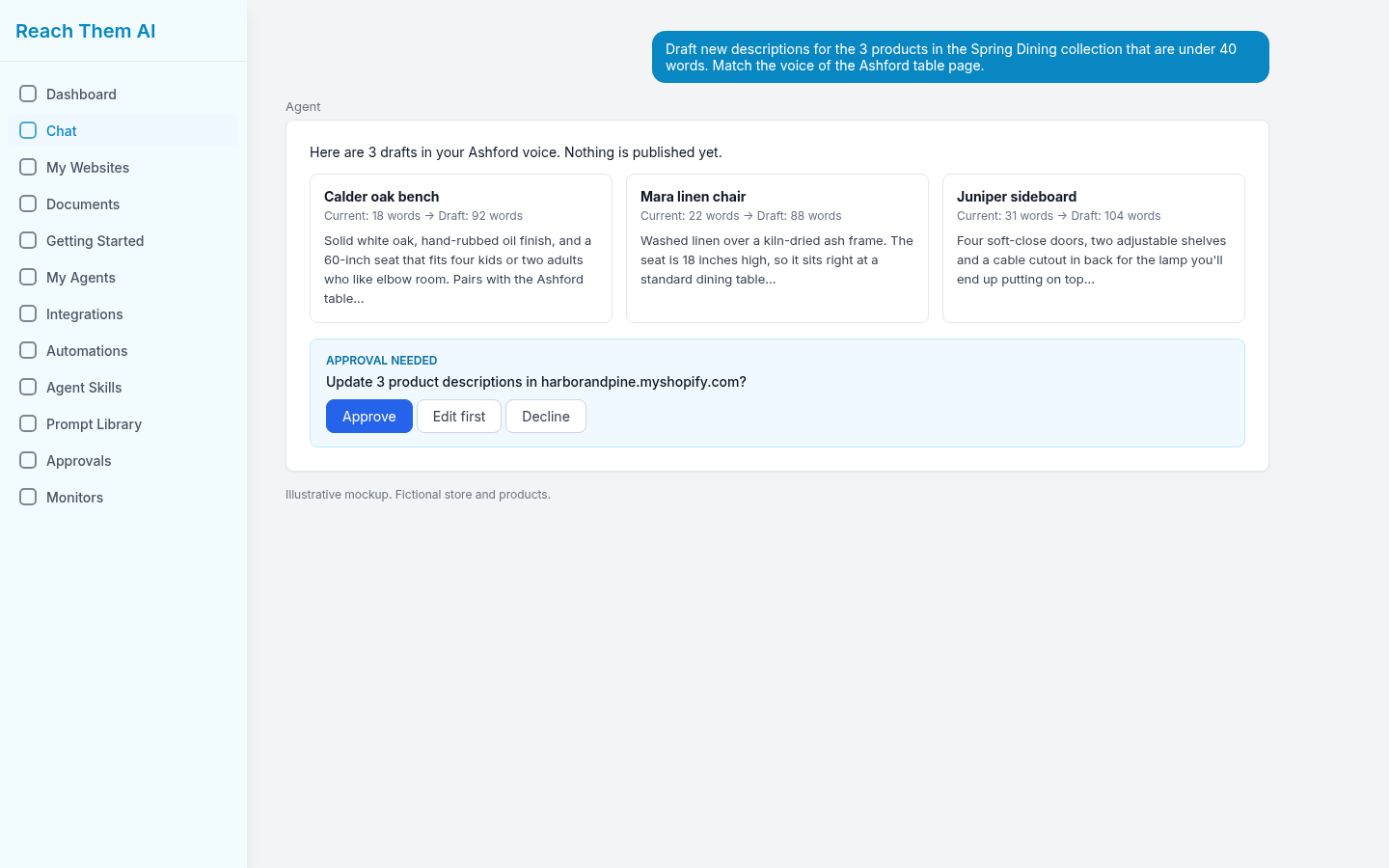
Product description drafts wait for your approval before they update the store. Illustrative mockup.
2. Abandoned-cart emails that adapt
Most shoppers who add to cart don't check out. Baymard Institute puts the average cart abandonment rate at 70.22%, based on 50 studies (Baymard Institute, updated September 22, 2025). Shopify's built-in abandoned checkout emails are a solid baseline. An agent can go further by writing variations for different products or cart values, suggesting send timing, and flagging which versions get more recoveries over time.
Should it decide on discounts by itself? Probably not. Set a ceiling and let it work under that.
3. Ad campaigns you can actually keep up with
Here's where many store owners burn money. Ads need constant attention: new creative, paused losers, budget shifts, search term cleanup. An AI marketing agent connected to Google Ads or Meta can draft ad copy, build campaigns from your product feed, and report what's working in plain English.
The non-negotiable part is approval. Nobody wants an agent quietly tripling their daily budget on a Friday night.
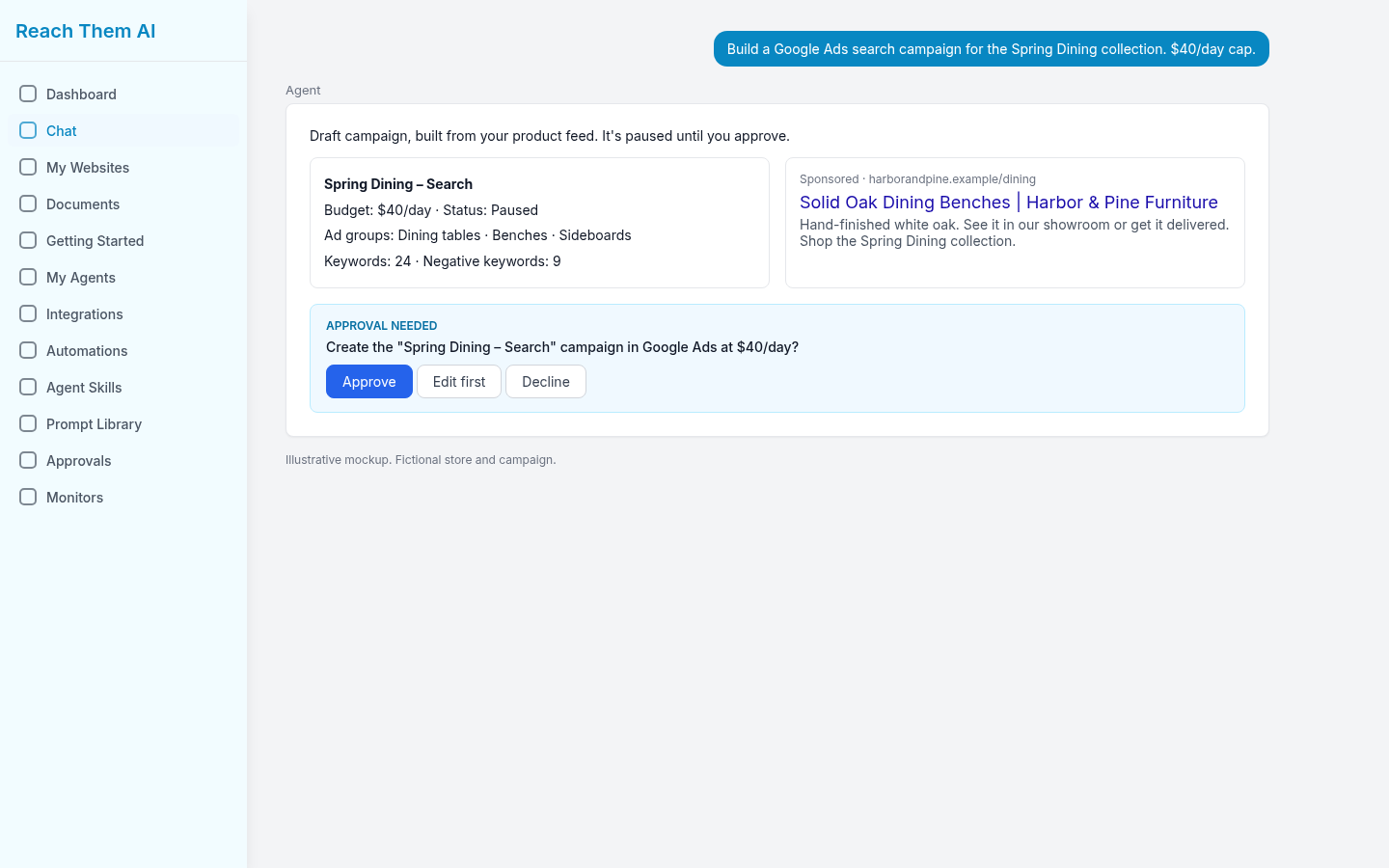
A campaign drafted from the product feed stays paused until you approve it. Illustrative mockup.
4. Catalog updates and cleanup
Catalogs get messy fast. Missing alt text, inconsistent tags, stale collections, products with three-word descriptions. An agent can scan your catalog, list what's broken, and propose fixes in batches. You approve the batch and it makes the changes.
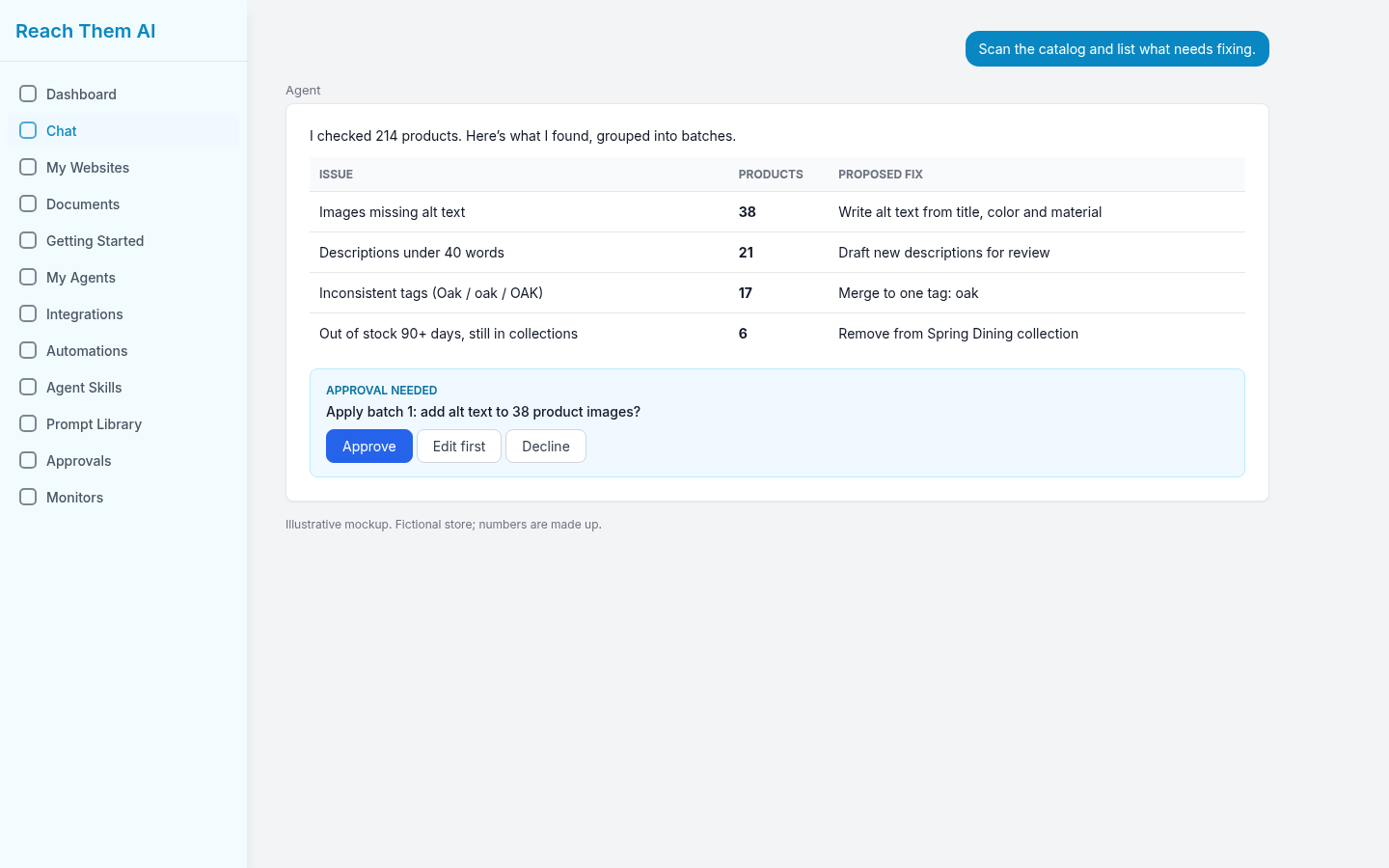
A catalog scan grouped into batches you approve one at a time. Illustrative mockup.
5. SEO content that brings in shoppers
Product pages alone rarely rank for the questions buyers ask before they're ready to purchase. Agents can research keywords, outline buying guides and draft blog posts that link back to your collections. (Yes, like the one you're reading.) Keep a person on fact-checking, since AI will happily state things that aren't true.
6. Social posts and email campaigns
New arrival? Restock? Seasonal sale? An agent can turn one product launch into a week of social captions, a campaign email and a matching ad. It's the repurposing that eats hours, and that's exactly what agents are good at.
7. Reporting that tells you what to do next
Dashboards show numbers. They rarely tell you what to change. An agent can pull data from Shopify, your ad accounts and analytics, then summarize it: which products are selling, which campaigns are wasting spend, and what it would try next week. You still make the call.
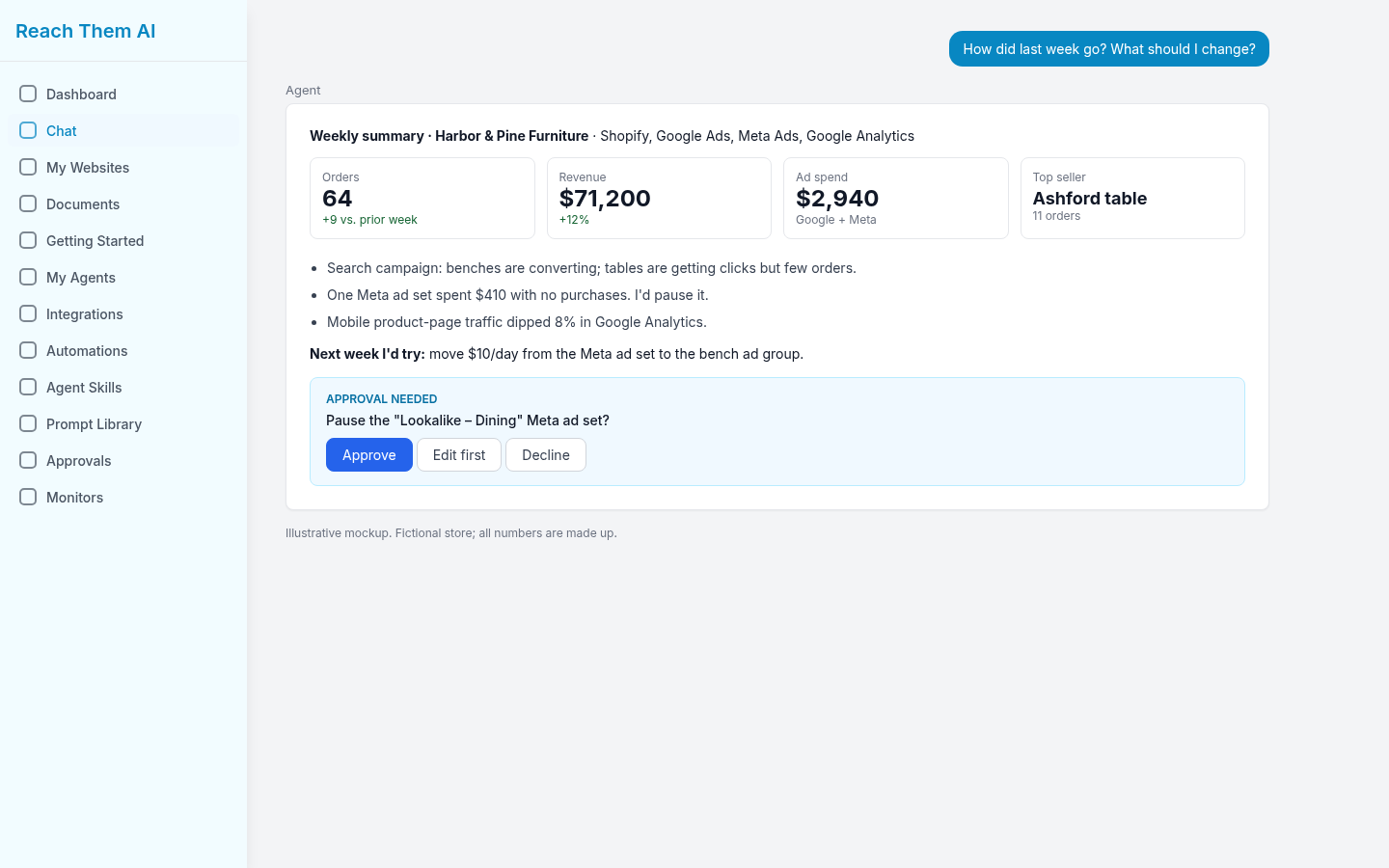
A weekly summary across Shopify, ads and analytics, with a suggested change that waits for approval. Illustrative mockup.
What are the risks of letting an AI agent run your store marketing?
The biggest risk is an agent acting without oversight. Wrong prices, off-brand copy and runaway ad spend are all real possibilities if you hand over full control on day one.
Shopify's own guide suggests setting limits on autonomy, for example letting an agent adjust prices within a small range but requiring human approval beyond it (Shopify, "What Are AI Agents?", 2026). That's a sensible model for marketing too. Other things to watch:
- Accuracy. AI can invent product claims. Check anything regulated (health, safety, materials).
- Brand voice drift. Review a sample of output every week, not just the first batch.
- Data access. Give the agent only the permissions it needs.
How do you get started with AI agents on Shopify?
Start small. Pick one workflow, connect the tools, set approval rules and measure for a month.
- Choose your first job. Product descriptions or ad reporting are low-risk starting points.
- Connect your accounts. Shopify, plus whichever ad and email platforms you use.
- Decide what needs sign-off. Anything that goes live or spends money should.
- Set a baseline. Note how long the task takes today and what it produces.
- Review after 30 days. Keep it, adjust it or drop it.
Where Reach Them AI fits
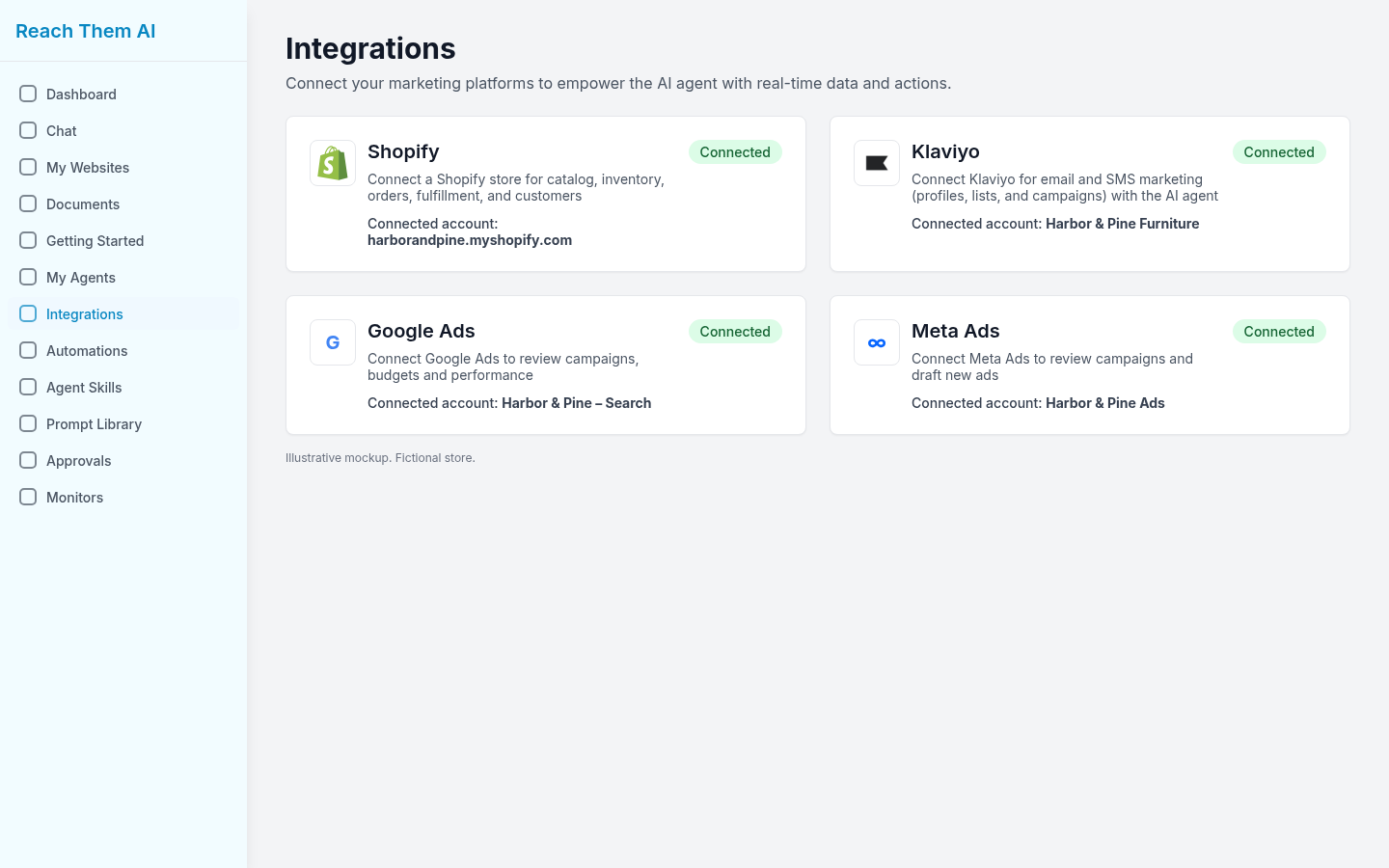
Reach Them AI is a marketing agent app that works across the tools a store already uses. It connects to Shopify, Klaviyo, Google Ads, Meta Ads, Instagram, Facebook, Google Analytics, Search Console, CallRail and more, most with a normal sign-in. You brief the agent the way you'd brief a teammate, and it comes back with drafts. Posting, sending and ad changes show an approval card first, so nothing goes live until you say yes.
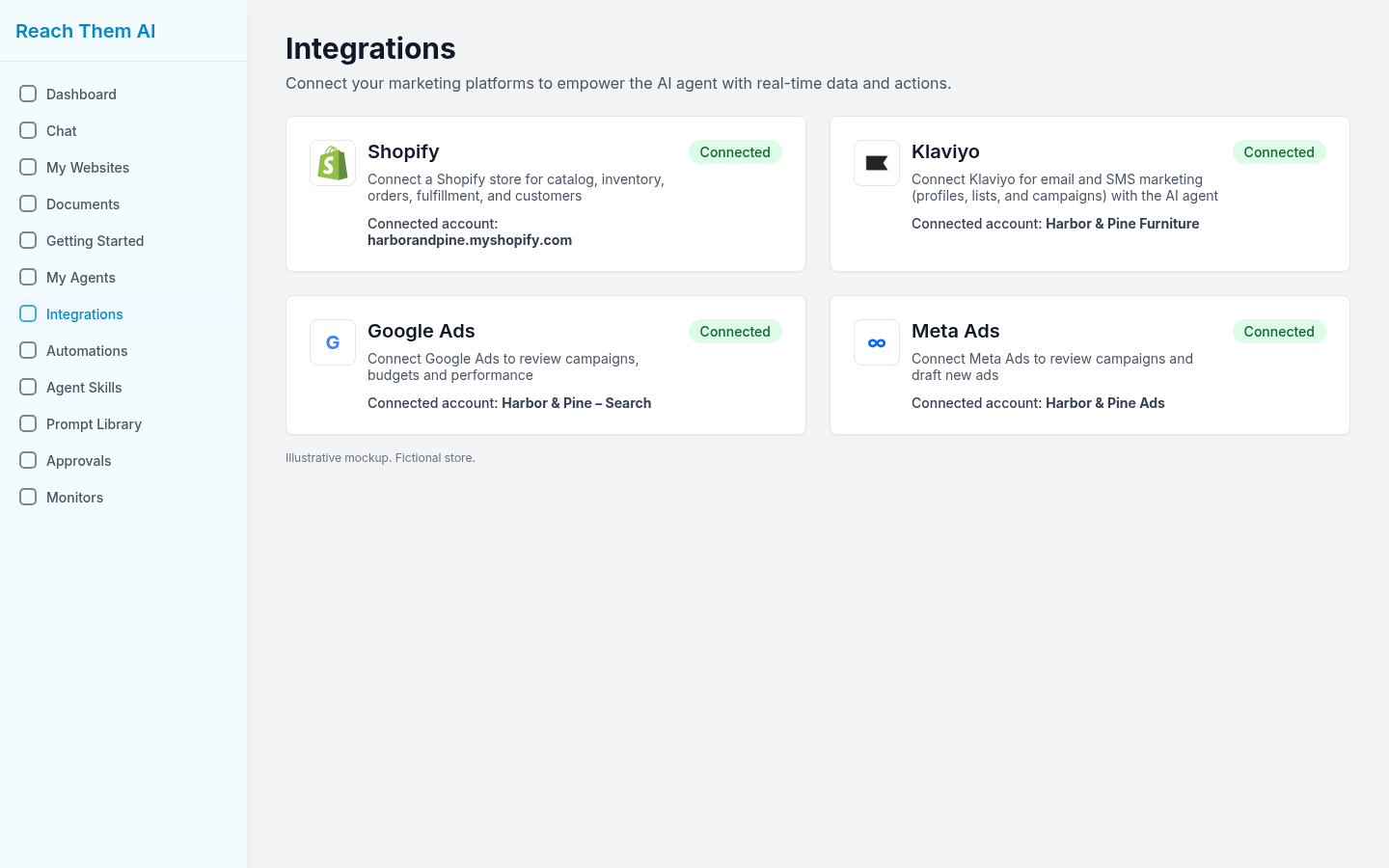
Shopify, Klaviyo and ad accounts connected on the Integrations page. Illustrative mockup.
For Shopify merchants, the agent can work with your catalog, inventory, orders, fulfillment and customer data. That covers the jobs in this guide: drafting product copy, cleaning up the catalog, planning campaigns from your products and reporting on what sold.
Try Reach Them AI and connect your Shopify store.
Frequently asked questions
Does Shopify have its own AI agent? Shopify offers Sidekick, an AI assistant inside the admin that can answer questions and take some actions for you. It's included with Shopify plans, though features and limits vary by plan (Shopify).
Can an AI agent write my Shopify product descriptions? Yes. It can draft descriptions from your product data and match your brand voice if you give it examples. Have a person review them before publishing.
Are AI agents for ecommerce safe to use with ad budgets? They can be, as long as you set spending limits and require approval for budget changes. Don't give any tool unlimited control of ad spend.
Do I need to know how to code? Not for most marketing agents. Building a custom shopping agent on Shopify's developer platform does take development work (Shopify.dev).
What's the best first task to automate? Something repetitive with low risk if it goes wrong, like drafting product copy or a weekly performance summary.
How much does a Shopify AI agent cost? It depends on the tool and how much work you hand it. Check each vendor's current pricing page before you commit.
Sources
- Shopify, "Sidekick," https://www.shopify.com/sidekick (accessed October 13, 2026)
- Shopify, "What Are AI Agents? Types, Uses, and How They Work (2026)," https://www.shopify.com/blog/ai-agents (accessed October 13, 2026)
- Shopify.dev, "Build commerce agents with UCP," https://shopify.dev/docs/agents (accessed October 13, 2026)
- Baymard Institute, "50 Cart Abandonment Rate Statistics 2026," https://baymard.com/lists/cart-abandonment-rate (updated September 22, 2025)
About the author: Rob Gelhausen, Founder, Reach Them AI
Comments
No comments yet.
Sign in to leave a comment. Comments stay hidden until an admin approves them.
Related
Oct 15, 2026 · Author
How to Automate Custom Abandoned Cart Emails Using AI

Oct 9, 2026 · Author
What Is a Forward Deployed Engineer? A Guide for Business Owners
Forward deployed engineers build AI inside a customer's business. Learn what FDEs do and earn, and how to get the same help without a $200,000 full-time hire.

Oct 9, 2026 · Rob Gelhausen, Lead Software Engineer, ReachThem.ai
What Is a Forward Deployed Engineer? (And Do You Need One?)