Blog · October 15, 2026 · Author
How to Automate Custom Abandoned Cart Emails Using AI
Last updated: October 14, 2026 · By Rob Gelhausen, Founder, Reach Them AI
Most abandoned cart emails say the same thing to everyone: "You left something behind." For a store selling $40 T-shirts, that's fine. For a store where one cart is worth $3,000, it's a missed sale wearing a template.
This guide shows you how to set up abandoned cart email automation that writes a different email for every shopper, using Shopify, Klaviyo and Reach Them AI. You keep the final say on every message.
Quick answer: To automate custom abandoned cart emails with AI, connect your Shopify store and Klaviyo account to an AI marketing agent, write your rules as a plain-English prompt, and run it on a daily schedule. The AI reads each abandoned checkout, writes a personal email for that customer, and saves it as a Klaviyo draft you approve before it sends.
Key takeaways
- About 70% of online carts are abandoned, according to Baymard Institute's average of 50 studies (updated September 2025).
- A generic reminder can't mention a customer's shipping quote, a price drop, or the showroom 40 minutes from their house. A personal email can.
- With Reach Them AI you connect Shopify and Klaviyo, write a prompt, pick a schedule, and review drafts in Klaviyo.
- Nothing sends until a person approves it.
- Measure the result against the recovery rate you had before.
Why do generic abandoned cart emails leave money on the table?
Because they ignore the reason the shopper left. Baymard's research found that, setting aside people who were "just browsing," 40% of US shoppers who abandoned a cart did so because extra costs like shipping, tax or fees were too high. Another 20% left because delivery was too slow. A template that shows a product photo and a "Complete your order" button addresses neither.
Here's an illustrative scenario (not a real client) to show what's at stake for a high-ticket store:
| Illustrative store | Low end | High end |
|---|---|---|
| Abandoned carts per day | 10 | 15 |
| Average order value | $1,000 | $5,000 |
| Carts that come back on their own within 30 days | 5% | 10% |
| Abandoned cart value per month (30 days) | $300,000 | $2,250,000 |
At those numbers, every single extra cart you win back is worth $1,000 to $5,000. If personal follow-ups bring back even one more cart a week than your current flow does, that's roughly $4,300 to $21,500 a month (about 4.3 weeks a month). (The exact lift will depend on your products, prices and list, so treat that as math, not a promise.)
So the bar for each email is high: it has to be good enough to earn back a four-figure sale.
What makes an abandoned cart email feel personal?
A personal email uses the facts of that shopper's cart and situation. A salesperson who saw the cart would mention these things without thinking. A template can't.
The details worth pulling into each email:
- The cart items themselves. Name the walnut dining table, the size, the finish.
- Where the customer lives. If they're within driving distance, invite them to your showroom to see the piece in person and take it home the same day.
- The shipping they were quoted. If shipping was the sticking point (and Baymard's data says it often is), address it directly.
- Price changes since they added to cart. A $200 drop is a great reason to write.
- Financing options, for big tickets where the monthly number matters more than the total.
- The saved checkout link, so they land right back where they left off.
- A real person as the sender. "Grant from the showroom" reads differently from "no-reply@."
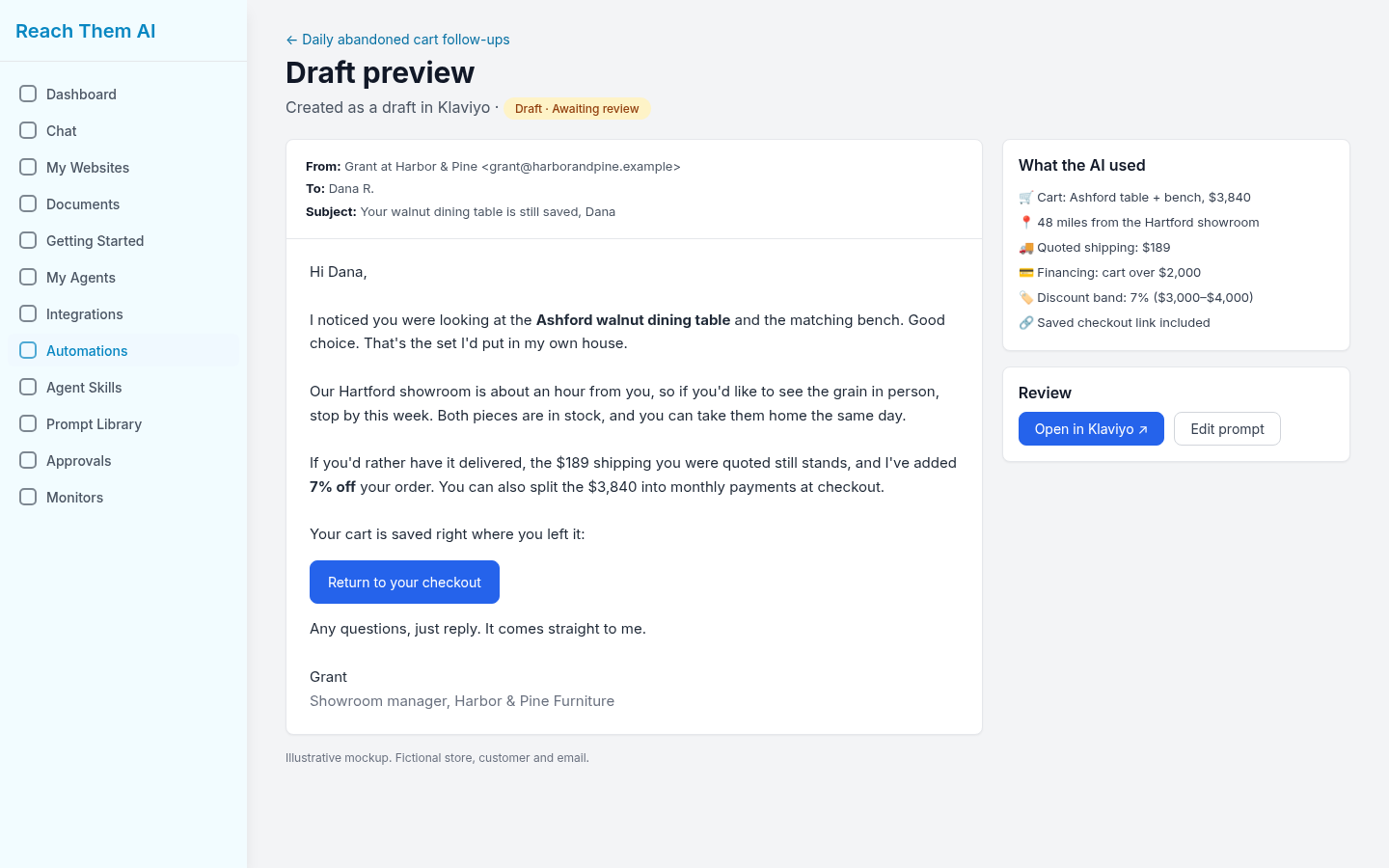
A sample draft written from one shopper's cart: a named sender, a showroom invite, the quoted shipping, financing and the saved checkout link. Illustrative mockup with a fictional store and customer.
One more detail matters. When the same customer starts two or three checkouts, they should get one combined email.
People already write emails like this by hand. Some stores have a staff member go through yesterday's carts every morning. It works, but it takes hours, it depends on who's in that day, and it breaks once you're past a dozen carts.
How do you automate custom abandoned cart emails using AI?
You give an AI agent access to your store and email platform, tell it your rules in plain English, and let it draft one email per cart on a schedule. Here's how that looks in Reach Them AI, step by step.
1. Connect Shopify and Klaviyo in Integrations
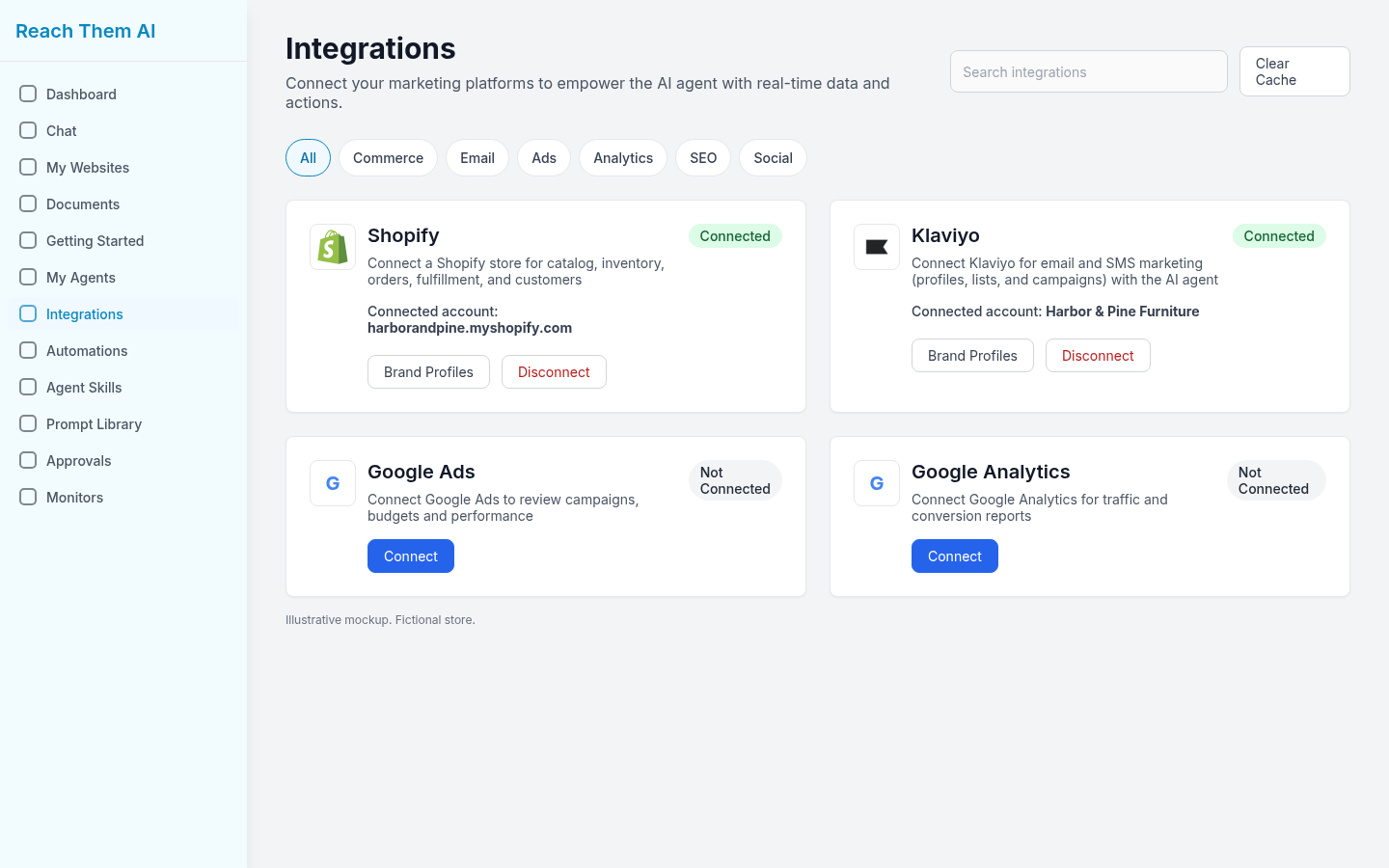
Open Integrations in Reach Them AI, find Shopify and Klaviyo, and connect each one. Both cards show "Connected" and the account name once you're in. Shopify gives the AI your carts, products and customers; Klaviyo is where the drafts land.
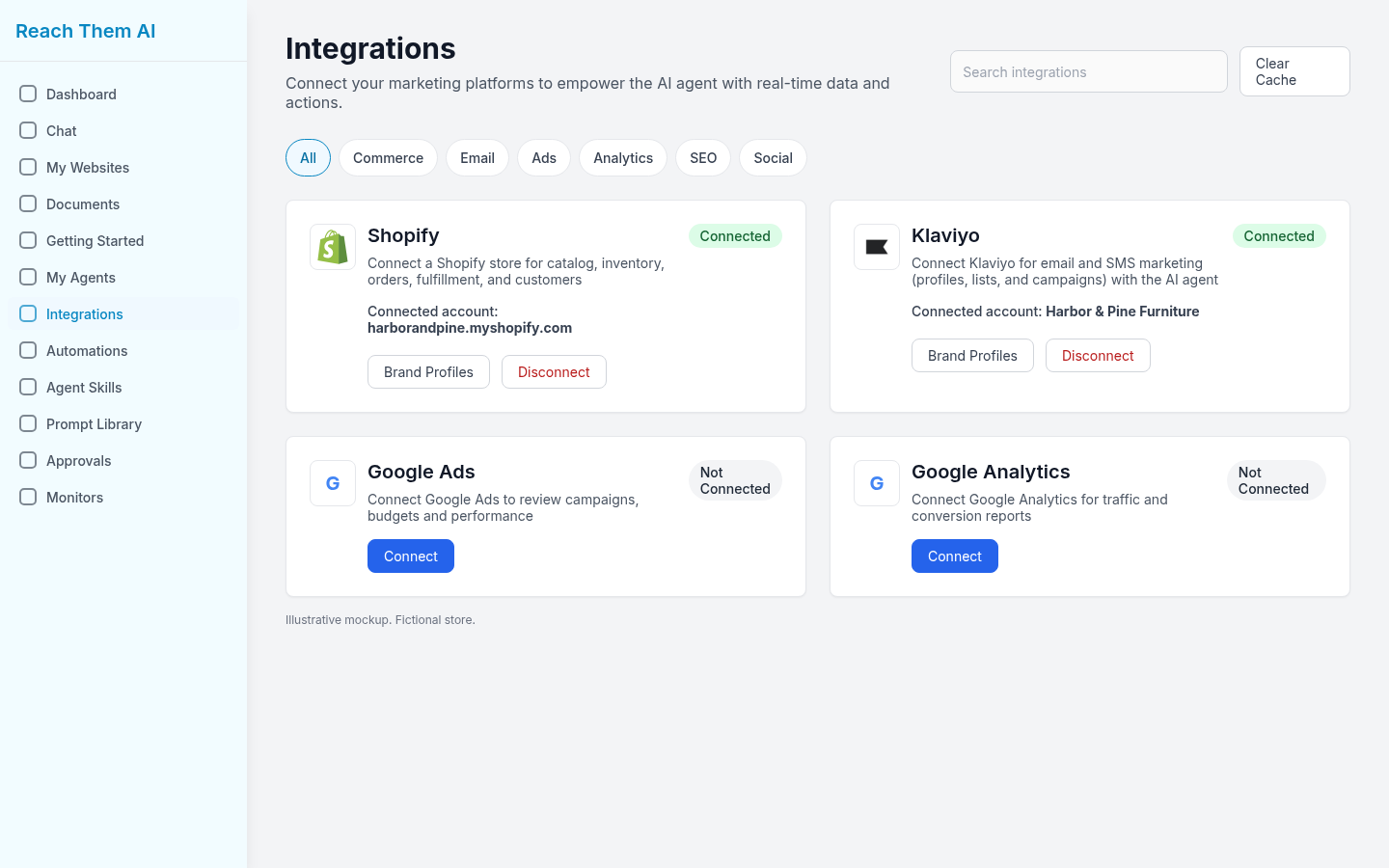
The Integrations screen with Shopify and Klaviyo connected. Illustrative mockup with a fictional store.
2. Create an automation and write your prompt
Go to Automations and create a new one. The Instructions box is where you describe what you want, the same way you'd brief a new hire. For example:
"Write a personal follow-up from Grant. Offer 5-10% off based on cart value. Invite customers within 2 hours' drive to our showroom."
You can be as specific as you like. Tell it to mention price drops, offer financing over a certain cart value, keep emails under 150 words, or never use exclamation points.
3. Set the schedule
In the Schedule panel, pick a frequency, time and time zone. A good starting point is Daily at 7:00 AM, covering the previous 24 hours of abandoned carts. That way drafts are waiting when your team starts the day.
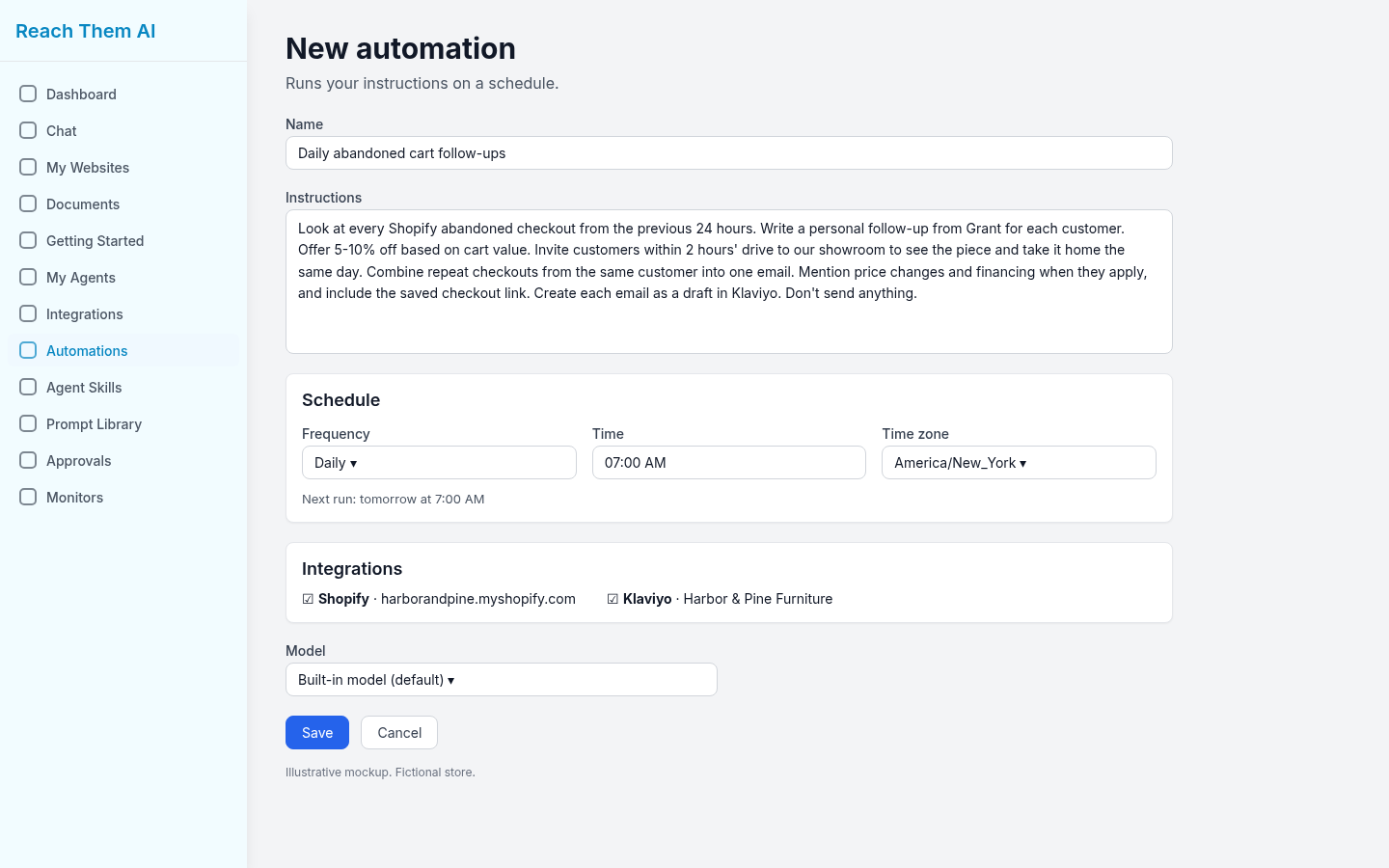
An abandoned cart automation with a custom prompt and a daily schedule. Illustrative mockup.
4. Choose which AI does the work
By default, the automation uses one of Reach Them AI's built-in models, which you pick from the Model menu. [CONFIRM: product status] We're also working on letting you trigger your own connected AI assistant, such as Grok Bot or Claude, from an automation. That option is coming soon.
5. Let the AI draft one email per cart
When the automation runs, the AI pulls the abandoned checkouts from the period you set. It looks at each customer and cart, writes an email that follows your prompt, and creates it as a draft in Klaviyo. Repeat checkouts from the same person get folded into one message.
6. Review and approve the drafts in Klaviyo
Open Klaviyo and read the drafts. Edit anything that's off, delete anything you don't want, and approve the rest. Nothing goes out without a human look, which matters most in the first few weeks while you're tuning the prompt.
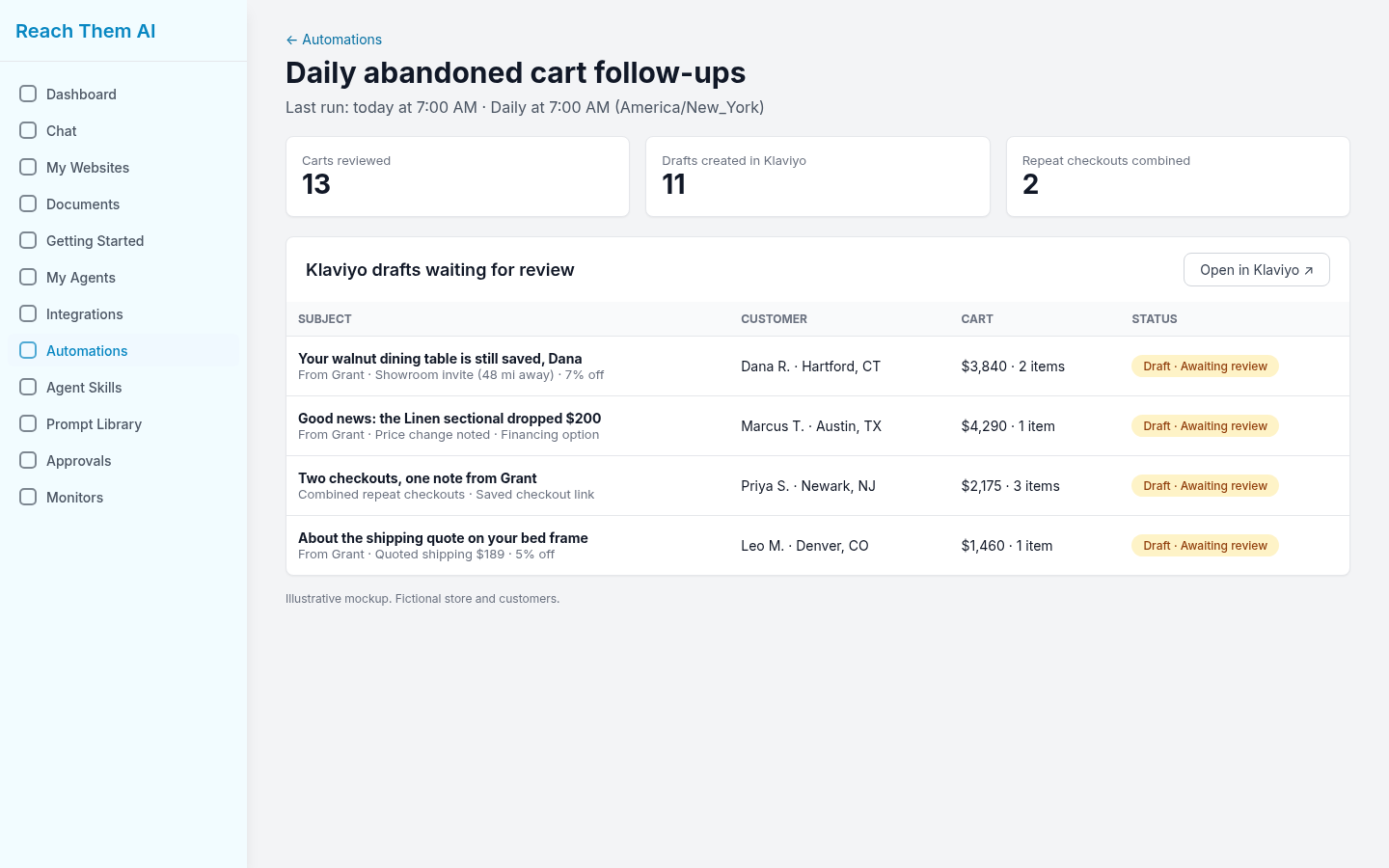
Personal drafts for each abandoned cart, waiting for review. Illustrative mockup with fictional customers.
7. Add follow-up emails as a series
One email is a start. For a second or third touch, create more automations whose prompts tell the AI to check what's already gone out in Klaviyo and write the next message. Say, a day-three note that answers a common objection, or a day-seven email that mentions financing.
8. Measure recovered orders and revenue
Before you switch anything on, write down your baseline: what share of abandoned carts come back today, and what they're worth. Then track recovered orders and revenue each week. If you start at 5% and personal emails get you to [CONFIRM: only cite a real result], you'll see it in recovered revenue.
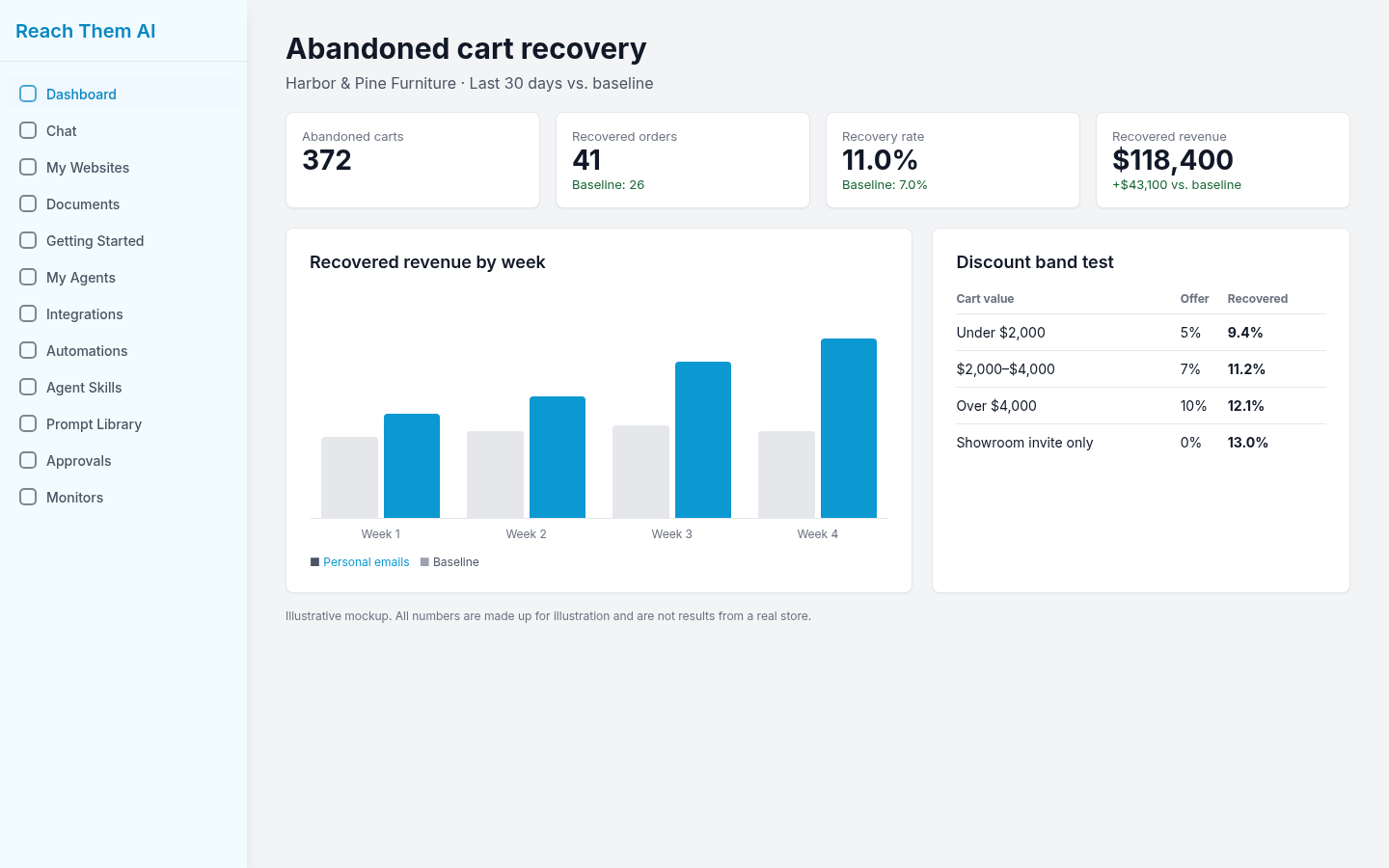
Track recovered orders, recovery rate and revenue against your baseline, and compare discount bands. Illustrative mockup: all numbers are made up.
How is this different from a standard Klaviyo abandoned cart flow?
A standard flow sends the same template to everyone, with the cart items dropped in. An AI-written email changes the whole message to fit the person.
| Standard Klaviyo abandoned cart flow | AI-personalized emails with Reach Them AI | |
|---|---|---|
| Copy | One template for everyone | Written fresh for each customer |
| Cart items | Dynamic product block | Named and described in the text |
| Location | Rarely used | Showroom invite for nearby buyers |
| Price changes and shipping | Not mentioned | Called out when relevant |
| Repeat checkouts | Can trigger several emails | Combined into one |
| Sender | Brand name | A named person, like Grant |
| Review | Sends automatically once live | Drafts wait for your approval |
| Setup effort | Low | A prompt and a schedule |
Klaviyo's built-in flow is still useful. Klaviyo's own help center notes that it allows "much more customization and targeting" than your store platform's default emails, including branching on cart value. The AI approach goes further on the copy itself.
If you want to see how a well-built Klaviyo abandoned cart and checkout flow is structured (triggers, timing, buyer vs. non-buyer splits, and a plain-text email from a real person), this 10-minute walkthrough covers it:
What are the best practices for AI abandoned cart emails?
Start with consent, a clean sending setup, and a human in the loop. Then test your offers.
- Only email people who've agreed to marketing. Use Klaviyo's consent status and keep your prompt pointed at subscribed profiles. [CONFIRM: legal review of consent wording for your regions]
- Turn off duplicate abandoned cart emails. If Shopify's built-in abandoned checkout email or an older Klaviyo flow is still running, shoppers will hear from you twice. Klaviyo's help center recommends turning off default platform messages to avoid this.
- Send from a verified sender. Set up your sending domain in Klaviyo so a note "from Grant" doesn't land in spam.
- Keep the review step, at least at first. Read every draft for the first few weeks. You'll learn fast which prompt lines need tightening.
- Test your discount bands. Try 5% on carts under one value and 10% over it, then compare recovered revenue, not just recovered orders. Some carts don't need a discount at all.
- Keep prompts specific. "Mention financing on carts over $2,000" beats "be helpful."
Not sure whether Shopify's own abandoned checkout email is switched on? This short video shows where that setting lives in Shopify admin:
[CONFIRM: client story: client type, workflow, what went wrong, result with a number]
How do you get started with Reach Them AI?
You'll need a Shopify store, a Klaviyo account, and about [CONFIRM: setup time] to write your first prompt. Connect both in Integrations, create a daily automation, and review the first batch of drafts tomorrow morning.
[CONFIRM: CTA text, e.g. "Try Reach Them AI"] and connect Shopify and Klaviyo: [CONFIRM: signup URL]. Pricing: [CONFIRM: pricing or link to /pricing].
[CONFIRM: 1-2 sentence first-person opinion from the author]
Frequently asked questions
Can AI write abandoned cart emails automatically?
Yes. An AI agent connected to your store can read each abandoned checkout and write an email for that customer. With Reach Them AI, it saves each one as a Klaviyo draft so you can approve it before it sends.
Do I need Klaviyo to use AI abandoned cart emails in Reach Them AI?
The workflow in this guide creates drafts in Klaviyo, so yes. [CONFIRM: other supported email platforms, if any]
Will the AI send emails without my approval?
Not in this setup. The automation creates drafts, and you approve them in Klaviyo. You decide when, or whether, to automate sending later.
How many abandoned cart emails should I send?
Many stores send a series of two or three. Start with one personal email, then add follow-up automations that check what's already been sent before writing the next one.
How much discount should an abandoned cart email offer?
There's no single right number. Test bands, such as 5% on smaller carts and up to 10% on larger ones, and compare recovered revenue against your margin.
What's a good abandoned cart recovery rate?
Measure your own baseline first. In the illustrative high-ticket store above, 5-10% of carts came back on their own within 30 days, and anything above that is lift from your emails.
Can I use my own AI assistant, like Claude or Grok Bot?
That's coming soon. [CONFIRM: product status] Today, automations run on Reach Them AI's built-in models.
Sources
- Baymard Institute, "50 Cart Abandonment Rate Statistics 2026," last updated September 22, 2025: https://baymard.com/lists/cart-abandonment-rate
- Klaviyo Help Center, "How to create an abandoned cart flow": https://help.klaviyo.com/hc/en-us/articles/115002779411
Comments
No comments yet.
Sign in to leave a comment. Comments stay hidden until an admin approves them.
Related

Oct 9, 2026 · Author
What Is a Forward Deployed Engineer? A Guide for Business Owners
Forward deployed engineers build AI inside a customer's business. Learn what FDEs do and earn, and how to get the same help without a $200,000 full-time hire.

Oct 9, 2026 · Rob Gelhausen, Lead Software Engineer, ReachThem.ai
What Is a Forward Deployed Engineer? (And Do You Need One?)