An AI phone agent that reviews every call your marketing brings in
For many local businesses, the phone is where marketing turns into revenue. A ringing phone does not tell you which ad, keyword, or page made it ring, whether the caller was a real lead, or whether anyone called them back. Reach Them AI gives you an AI phone agent that works with CallRail to answer those questions. It reads your call data, transcripts, and recordings, ties calls back to their sources, scores lead quality, and drafts follow-up for the calls that slipped through.
It reviews calls after they happen. It does not answer the phone, and texts wait for you.
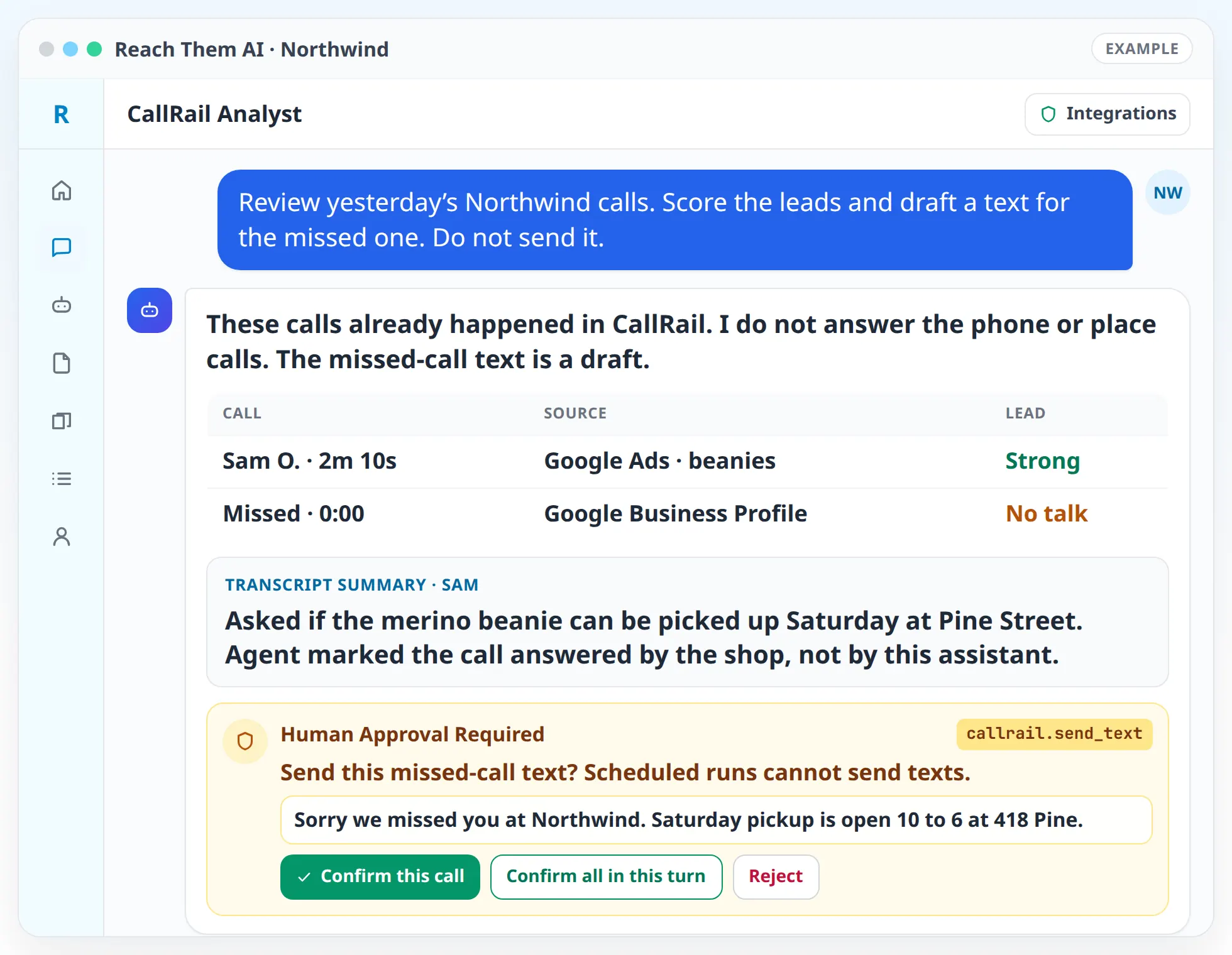
The agent works with calls after they happen. It does not pick up the phone or talk to callers. Anything it would change in CallRail, and any text it would send to a caller, waits for your approval.
What the AI phone agent does
- Attributes calls to their sources. The agent shows which channels, campaigns, keywords, and landing pages produced calls, so you can see which marketing makes the phone ring.
- Reviews transcripts and recordings. It reads call transcripts and summarizes what each caller wanted, how the call went, and whether a next step was set.
- Scores lead quality. It sorts calls into qualified leads, existing customers, spam, wrong numbers, and missed calls, using rules you agree on.
- Finds missed opportunities. Missed and unanswered calls are listed with the caller's source, so you can see how many leads each channel lost.
- Drafts follow-up. For missed calls, the agent drafts a short text reply. CallRail sends it only after you approve that specific message.
- Suggests tags and setup changes. The agent drafts tag, tracker, and company setting changes in CallRail and applies them only after you confirm.
- Feeds your ad decisions. Call data goes into Google Ads and Meta Ads analysis, so campaigns that drive phone leads get credit for them.
- Answers questions in plain language. "Which keywords brought in the most booked jobs last month?" gets an answer with the calls behind it.
How it works, step by step
- 01
Connect CallRail. CallRail connects with OAuth from the Integrations page. The first connection loads the CallRail tools for your agent.
- 02
Agree on what counts as a good call. Tell the agent what a qualified lead sounds like for your business, for example "asked for a quote" or "booked a service visit."
- 03
Ask a question or request a report. Start with "summarize last week's calls by source" or "list missed calls from Google Ads this month."
- 04
Review the findings. The agent shows the calls behind each number. You can open any call summary to check its reasoning.
- 05
Approve follow-ups and changes. Text replies, new tags, and tracker changes each come to you as an approval card.
- 06
Schedule a weekly call review. An automation can read last week's calls every Monday and send you a summary. Scheduled runs can read CallRail and report, and they never change CallRail or text a caller.
Integrations the agent uses
 CallRail
CallRail for calls, transcripts, recordings, trackers, tags, form submissions, and text messages
 Google Ads
Google Ads for campaign and keyword data next to the calls they produced
 Meta Ads
Meta Ads for calls that come from Facebook and Instagram campaigns
 Google Analytics
Google Analytics for the website visits that led to calls
 Google Sheets
Google Sheets for exports and weekly call logs
 HubSpot
HubSpot for matching callers to CRM contacts when you use it
What you approve before anything goes live
The agent reads CallRail data without stopping to ask. It does ask for explicit confirmation in chat before it changes anything in CallRail, including tags, trackers, numbers, and company settings, and before it sends any text message. Scheduled automations cannot make CallRail changes or send texts at all, even when other live actions are turned on.
Call recordings and transcripts contain personal information. The agent summarizes them for your team and does not copy them into other tools unless you ask.
What this agent does not do
The agent does not answer incoming calls, place outbound calls, speak with callers, or book appointments by voice. If you need a live AI receptionist, use a dedicated voice service alongside CallRail. The agent can then review those calls along with the rest, as long as they run through your CallRail tracking numbers.
Who this is for
- Home service, legal, medical, and auto businesses where most leads arrive by phone
- Teams running Google Ads or Meta Ads that need to know which campaigns drive calls
- Owners who suspect missed calls are costing them jobs and want to see how many
- Marketing managers who need a weekly call report without listening to every recording
- Agencies proving the value of their campaigns to clients with call data
Agent templates for phone and call tracking
No published template yet. CallRail Analyst and Paid Ads Analyst are draft templates.
- CallRail AnalystComing soon
- Paid Ads AnalystComing soon
FAQ
Does the AI phone agent answer my phone?
No. It works with calls after they happen, using CallRail. It reviews transcripts and recordings, finds where calls came from, scores lead quality, and drafts follow-up texts for you to approve.
Do I need CallRail?
Yes. CallRail supplies the tracking numbers, recordings, transcripts, and call data the agent reads. You connect your own CallRail account with OAuth.
Can the agent text people who called?
It drafts the text, and CallRail sends it after you approve that specific message. Scheduled automations cannot send texts.
How does the agent decide whether a call was a good lead?
You agree on the rules at the start, such as "asked for a quote" or "booked a visit." The agent applies them to each transcript and shows its reasoning so you can correct it.
Can it connect calls to my Google Ads campaigns?
Yes. With CallRail and Google Ads connected, the agent can show which campaigns and keywords produced calls and use that in its ad recommendations.
Find out what your phone calls are telling you
Connect CallRail and ask the agent for last month's calls by source. You will see which marketing drives calls and which calls went unanswered.