AI content generation for every channel you market on
Marketing needs a lot of content: blog posts and service pages for search, emails for your list, captions and videos for social. Writing all of it in a consistent voice is a full-time job. Reach Them AI gives you AI content generation agents that work from one brand profile and one brief, then produce the pieces each channel needs.
Writing stays a draft. Publishing waits for an approval card in the chat.
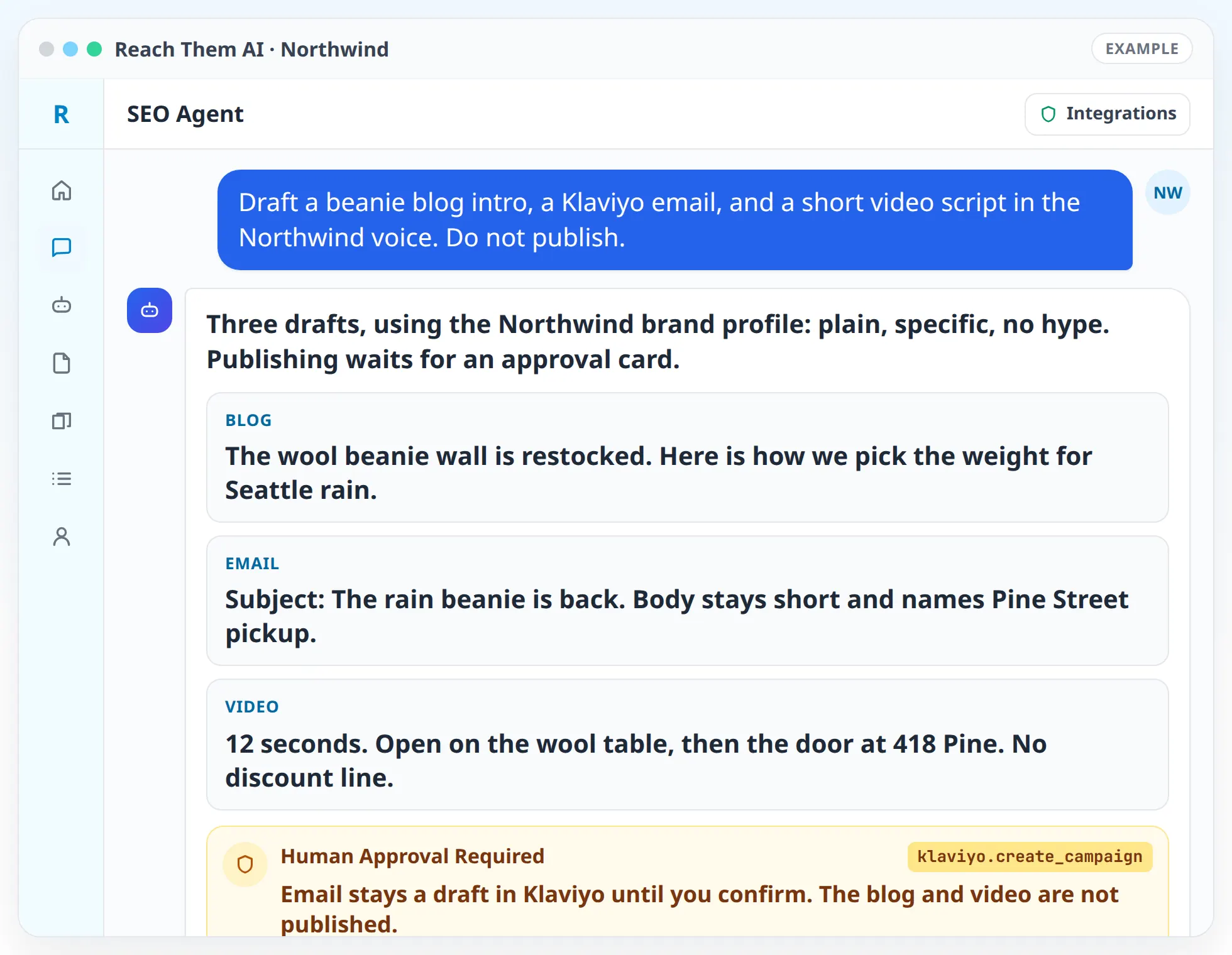
Every piece starts as a draft in the chat. You read it, ask for changes, and approve it before anything is published or sent.
What the content agents produce
- SEO articles and service pages. The SEO Agent starts with keyword research and a look at the pages that already rank, then writes a draft with headings, a title tag, and a meta description.
- Location pages. The Local SEO Agent writes city and service area pages with details specific to each place, so they do not read like copies of each other.
- Email campaigns. The Klaviyo Agent writes subject lines, preview text, and the email body, and builds the template in Klaviyo as a draft.
- Video. The Video Gen Agent takes a brief, writes the script and storyboard, and produces the video with the tools you connect: HeyGen for presenter and avatar videos, Runway, Luma, or Kie.ai for generated clips, and Creatomate or Shotstack for template-based edits.
- Translations. The Video Gen Agent can translate and dub existing videos with HeyGen for other languages.
- Images and designs. Generate images in the chat or build designs in Canva for posts, ads, and emails.
- Product copy. The Shopify Agent writes product titles, descriptions, and image alt text that match your brand.
How AI content generation works, step by step
- 01
Set up your brand profile. Add your voice, audience, offers, words you always use, and words you never use. Turn on Include Branding in the chat and the agent reads the profile before it writes.
- 02
Write a short brief. Goal, audience, channel, and call to action. The agent asks for anything missing before it starts.
- 03
Review the outline. For longer pieces, the agent shows you the outline and the sources it plans to use. You can change direction before any full draft exists.
- 04
Get the draft. The agent writes the piece, then runs a humanizing pass that removes stock phrases and filler.
- 05
Turn one piece into many. Ask the agent to turn the article into an email, a set of captions, and a short video script.
- 06
Approve and publish. Save drafts to Google Docs, publish to your site, send through Klaviyo, or upload to YouTube, each after you approve it.
Integrations the agents use
 Semrush
 Firecrawl
 Google Search Console
Semrush, Firecrawl, and Google Search Console for topic research and content gaps
 Google Docs
 Google Drive
Google Docs and Google Drive for drafts, briefs, and shared review
 Klaviyo
Klaviyo for email templates and campaigns
 HeyGen
 Runway
 Luma
Luma Kie.ai
 Creatomate
 Shotstack
HeyGen, Runway, Luma, Kie.ai, Creatomate, and Shotstack for video
 YouTube
YouTube for publishing finished videos
 Canva
CanvaCanva for designs
 Shopify
 Wix
WixShopify and Wix for product and site content
 Instagram
 Facebook Pages
 LinkedIn
Instagram, Facebook Pages, and LinkedIn for social posts
What you approve before anything goes live
Writing and generating are drafts. Publishing is a separate step that needs your approval. In chat, the agent shows an approval card before it uploads a video to YouTube, sends a Klaviyo campaign, posts to a social account, or changes a product on Shopify.
Scheduled content automations default to generate only: they write drafts and stop. You can switch an automation to create drafts in the connected platform, or to publish, and that choice is made per automation.
Video generation tools charge credits on your own accounts with those providers. The agent tells you which tool it plans to use before it starts a render.
Writing that sounds like your business
AI content often sounds the same no matter who it is for. The agents work against that in two ways. They read your brand profile when Include Branding is on, and they finish each draft with a humanizing pass based on the patterns that make text sound machine-written, like empty contrasts, stacked adjectives, and closing lines that repeat the point.
They also stick to facts you gave them. If a draft needs a price, a statistic, or a customer quote you have not provided, the agent asks for it instead of making one up.
Who this is for
- Small teams that need a steady flow of blog, email, and social content
- Local businesses that want service and location pages written properly
- Ecommerce brands with large catalogs that need product copy
- Brands that want short videos without hiring a production team
- Agencies producing content for several clients, each with its own brand profile
Agent templates for content generation
- Explore the SEO Agent
- Explore the Video Gen Agent
- Explore the Klaviyo Agent
- Social Media Content AgentComing soon
Related services
FAQ
What kinds of content can the agents create?
Blog posts, service and location pages, title tags and meta descriptions, emails, social captions, product descriptions, images, Canva designs, and videos, including scripts, storyboards, avatar videos, generated clips, and translated versions.
Will the content be ready to publish?
It is written to be close. You should still read every piece, check the facts, and add details only you know. The agent asks for missing facts rather than inventing them.
Do I need my own accounts for the video tools?
Yes. You connect your own HeyGen, Runway, Luma, Kie.ai, Creatomate, or Shotstack account, and renders use your credits with that provider. You only need the ones you plan to use.
Can the agents publish for me?
Yes, after you approve. The agent can upload to YouTube, send through Klaviyo, post to connected social accounts, and update Shopify products, each with an approval step first.
How do the agents keep my brand voice?
Turn on Include Branding in the chat and the agent reads your brand profile before writing. You can also paste example copy you like, and the agent will match it.
Turn one brief into a week of content
Set up your brand profile once. Then ask for the article, the email, and the video script, and approve each one before it goes out.