AI social media marketing from calendar to published post
Posting regularly is what keeps a brand visible on social media, and it is also the first thing to slip when the week gets busy. Reach Them AI gives you AI social media marketing agents that plan the calendar, write the captions, make the images and short videos, and post to your connected accounts. Instagram, Facebook Pages, LinkedIn, and YouTube are live today.
The agent shows the post and waits. Nothing publishes until you approve it.
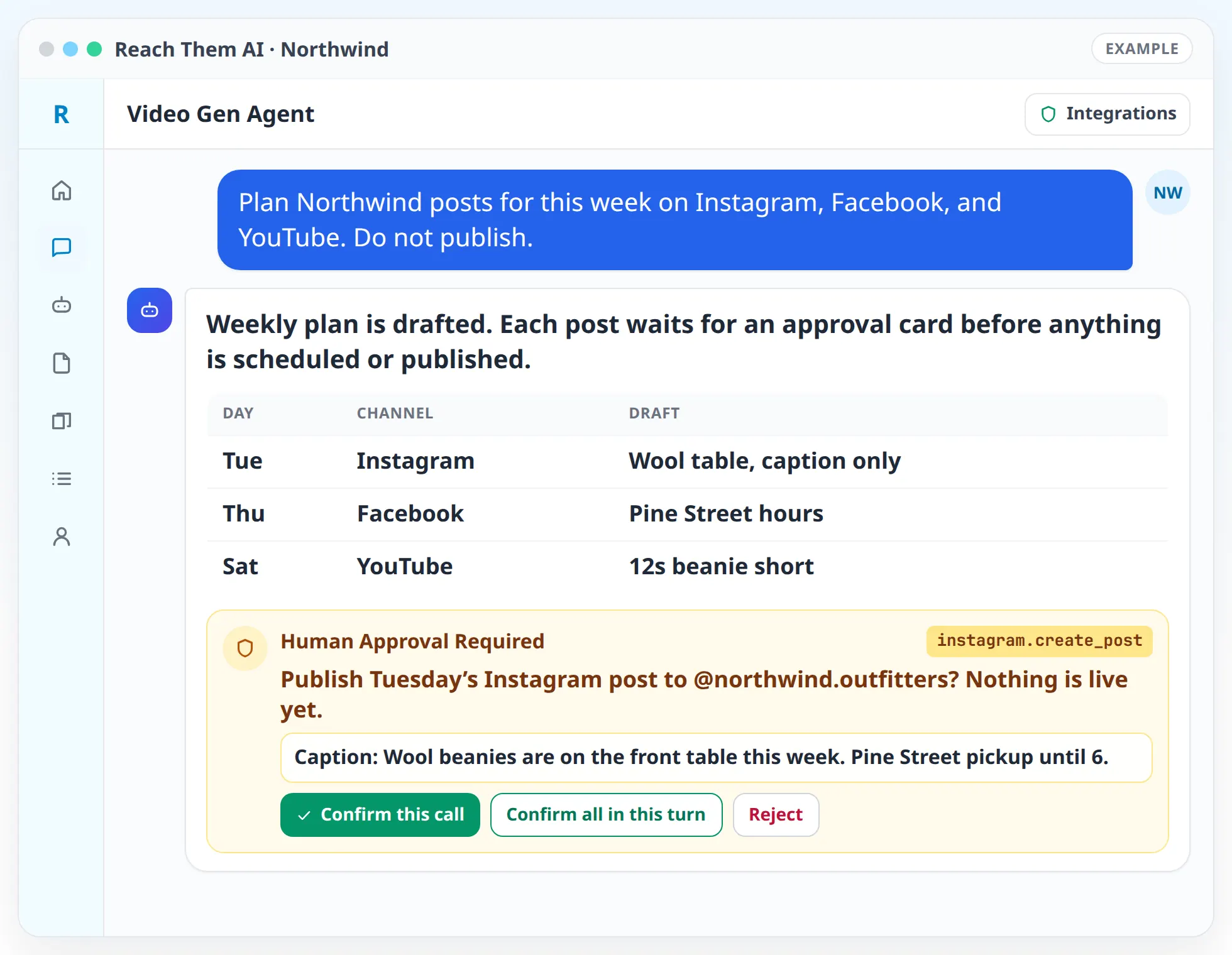
You see a preview of every post before it goes out. The agent publishes only after you approve, or on a schedule you have explicitly allowed.
What the social media agents do
- Plan a content calendar. The agent builds a month of posts around your offers, seasons, local events, and the topics your audience responds to.
- Write for each network. Captions, hashtags, and titles are written to fit how people use each platform, from a short Instagram caption to a longer LinkedIn post or a YouTube description.
- Make images. Generate images in the chat, build designs in Canva, or put together multi-image carousels in a set order.
- Make short videos. The Video Gen Agent writes the script, plans the shots, and produces vertical and horizontal videos with HeyGen, Runway, Luma, Kie.ai, Creatomate, or Shotstack.
- Preview before posting. Every post appears in the chat as it will look, with the caption, media, and target account.
- Publish and schedule. After you approve, the agent posts to your Facebook Page, Instagram, LinkedIn, or YouTube.
- Promote what works. For paid reach, the agent can review your Meta Ads performance and draft campaign changes for you to approve.
How it works, step by step
- 01
Connect your accounts. Facebook Pages, Instagram, LinkedIn, and YouTube connect from the Integrations page. Add Canva and the video tools you use.
- 02
Set your brand profile. Voice, audience, offers, colors, and any words to avoid. Turn on Include Branding so the agent writes from it.
- 03
Plan the month. Ask for a calendar. The agent proposes dates, topics, formats, and networks, and you adjust anything before it writes.
- 04
Create the posts. The agent writes captions and produces images or videos for each slot on the calendar.
- 05
Approve each post. You see the preview and approve, edit, or skip it. Approved posts are published or scheduled on the connected account.
- 06
Automate the routine. Set an automation to draft next week's posts every Friday. You choose whether it only writes drafts, creates drafts in the platform, or publishes.
Publishing modes for scheduled automations
Scheduled social automations have three modes, and each automation uses one:
- 01
Generate only. The agent writes the posts and makes the media, and nothing leaves the app. This is the default.
- 02
Generate and draft. The agent creates drafts inside the connected platform where the network supports drafts, so you can publish from there.
- 03
Generate and publish. The agent posts on schedule. This needs two settings turned on for that automation: live actions and social publishing.
Integrations the agents use
 Instagram
Instagram for posts and account content
 Facebook Pages
Facebook Pages for posts on your business page
 LinkedIn
LinkedIn for posts from your profile
 YouTube
YouTube for uploading videos and reading channel analytics
 Meta Ads
Meta Ads for paid campaigns on Facebook and Instagram
 Canva
CanvaCanva for designed graphics
 HeyGen
 Runway
 Luma
Luma Kie.ai
 Creatomate
 Shotstack
HeyGen, Runway, Luma, Kie.ai, Creatomate, and Shotstack for video
 Google Drive
Google Drive for storing finished media
Coming soon: TikTok, X, and LinkedIn Ads. They are not available to connect yet.
What you approve before anything goes live
In chat, the agent shows the post preview and an approval card before it publishes, schedules, or deletes anything on a social network. Ad changes in Meta Ads need your confirmation every time, and scheduled automations never change ads.
Automations follow the publishing mode you picked. Generate only is the default, so a new automation will not post until you change its mode and turn on publishing for it.
Who this is for
- Local businesses that want to post every week without writing every caption
- Brands that want short videos for Reels and YouTube Shorts without a video team
- Owners who post on several networks and want one place to plan and approve
- B2B companies that want regular LinkedIn posts from a consistent voice
- Agencies running social calendars for several clients
Agent templates for social media marketing
- Explore the Video Gen Agent
- Social Media Content AgentComing soon
- Meta Ads AnalystComing soon
Related services
FAQ
Which social networks can the agent post to?
Facebook Pages, Instagram, LinkedIn, and YouTube today. TikTok and X are coming soon and are not available to connect yet.
Will the agent post without asking me?
Not by default. In chat it asks for approval before every post. A scheduled automation only publishes if you set it to generate and publish and turn on publishing for that automation.
Can the agent make videos for Reels and Shorts?
Yes. The Video Gen Agent writes the script and produces vertical video with the tools you connect, such as HeyGen for presenter videos or Runway and Luma for generated clips.
Can the agent run paid social ads?
It can review Meta Ads performance and prepare campaign, budget, or creative changes. Every change to a live ad account needs your confirmation, and scheduled automations never change ads. LinkedIn Ads is coming soon.
Do I need a design tool?
No. The agent can generate images in the chat. If you use Canva, connect it and the agent can work with your designs there.
Plan next month's posts in one conversation
Connect your accounts, ask for a calendar, and approve the posts you like. The agent handles the writing, the media, and the posting.