Get more customer reviews with an AI review generation agent
Most happy customers will leave a review if someone asks at a good moment and makes it easy. The hard part is remembering to ask, every customer, every week. Reach Them AI gives you an AI review generation agent that plans your review requests, writes the emails and text messages in your brand voice, builds the campaign in Klaviyo, and drafts a reply for each review that comes in.
Every send waits for you. Klaviyo campaigns stay drafts until you confirm.
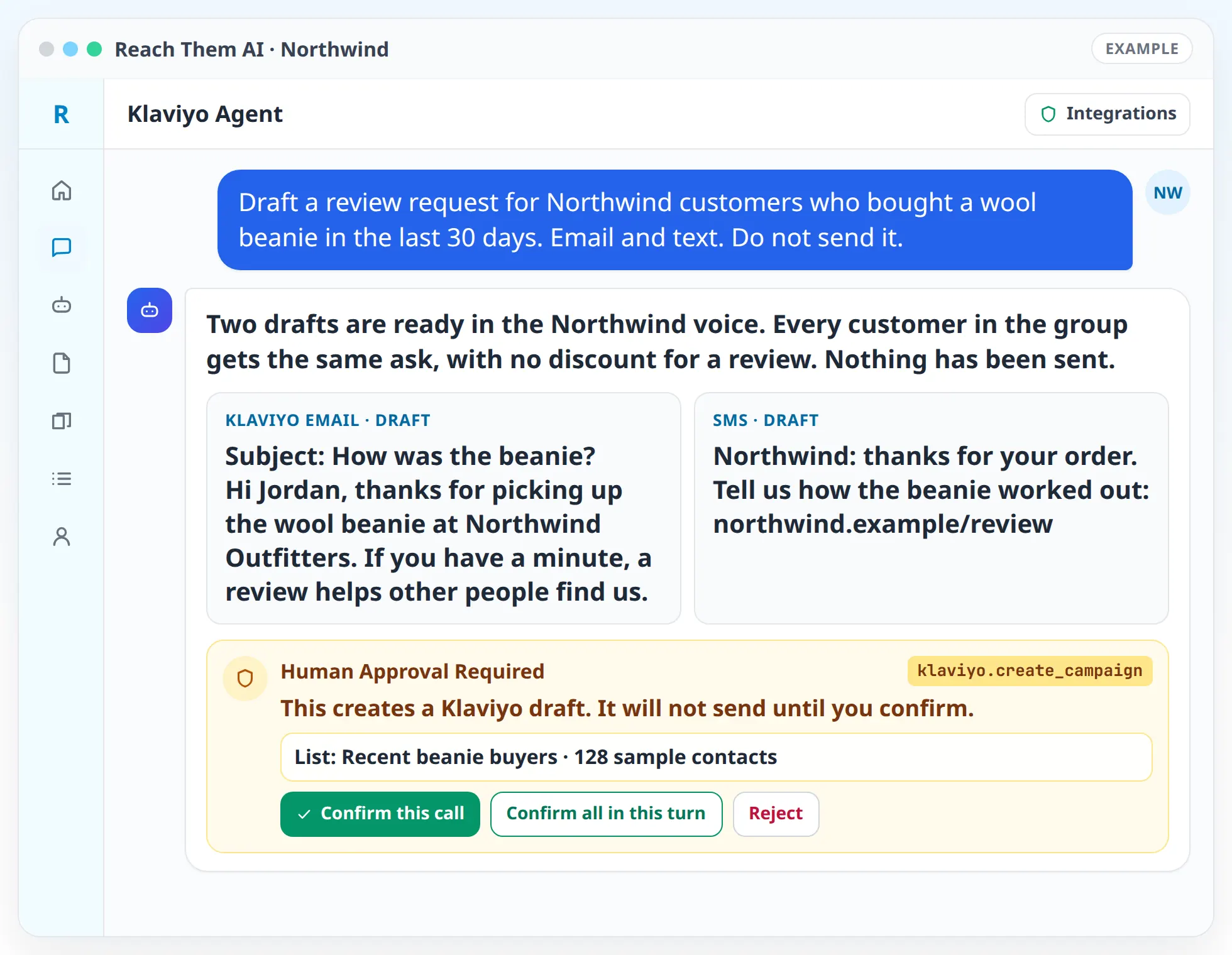
You stay in charge of what goes out. The agent shows you every message and every audience before anything sends, and it waits for your yes.
What the review generation agent does
- Finds the right moment to ask. The agent looks at when a job was finished or an order was delivered, using your Shopify orders, Wix contacts, HubSpot records, Klaviyo events, or a spreadsheet you upload. Then it suggests when each request should go out.
- Writes the request. You get short email and text drafts with your business name, your Google review link, and a tone that matches your brand profile. Ask for two versions and compare them side by side.
- Builds the campaign. With Klaviyo connected, the agent sets up the audience and the campaign as a draft and tells you how many people it will reach before you send.
- Plans a single reminder. People who did not open the first message can get one follow-up, and the sequence stops there.
- Drafts review replies. Paste in new reviews or upload an export, and the agent writes a thank-you for the good ones and a calm, specific answer for the critical ones.
- Reports on progress. Monthly summaries track review count and average rating from the numbers you share, and each figure lists where it came from. If a number is missing, the report says so.
How AI review generation works, step by step
- 01
Connect your tools. Klaviyo handles email and text campaigns. Gmail works for one-off emails. Shopify, Wix, or HubSpot can supply the customer list if it lives there.
- 02
Set up your brand profile. Add your business name, voice, and services, and paste the review link from your Google Business Profile. Turn on Include Branding in the chat so the agent uses them in every draft.
- 03
Ask for a plan. Tell the agent something like "ask last month's customers for a Google review." It proposes who to ask, when, on which channel, and the exact wording.
- 04
Approve the send. You check the audience size and the message. The agent sends or schedules the campaign only after you confirm.
- 05
Answer the reviews. As reviews arrive, the agent drafts replies sorted by sentiment. You post them from your Google Business Profile or the review site.
- 06
Look at the month. A short report shows new reviews, rating trend, and what to change in next month's requests.
Integrations the agent uses
 Klaviyo
Klaviyo for review request emails and text messages, audiences, and consent checks
 Gmail
GmailGmail for individual requests and follow-ups to a single customer
 Shopify
Shopify for recent orders and customers
 Wix
WixWix for site contacts and form submissions
 HubSpot
HubSpot for CRM contacts and closed deals
 Google Sheets
Google Sheets for customer lists you keep in a spreadsheet
 Firecrawl
Firecrawl for reading your public review pages when you want the agent to check them
What you approve before anything goes live
Every send waits for you. In chat, the agent shows an approval card before it sends a campaign, schedules one, or emails a customer through Gmail. Klaviyo campaigns stay as drafts until you confirm.
Scheduled automations follow the same rule unless you change it. You can have the agent draft next week's review requests every Monday, and those drafts will sit there for you to check. A scheduled run only sends on its own if you turned on live actions for that automation.
Review replies are drafts too. The app does not connect to Google Business Profile or Yelp, so you post each reply yourself.
Asking for reviews without breaking platform rules
Google's review policy says businesses should not selectively ask for positive reviews or offer incentives in exchange for them. The agent is set up to work inside those rules. It asks every customer in a group the same way, it does not route unhappy customers away from your public review page, and it will not write a request that offers a discount for a review.
It also respects consent. Before a Klaviyo email or text goes out, the agent checks that each person is subscribed to that channel. Customers who never opted in to texts will not get one.
For healthcare, legal, and other regulated businesses, the agent flags reviews that mention private details and suggests a reply that does not confirm the person was a client or patient.
Who this is for
- Home service companies that finish jobs every day and want a request to go out after each one
- Shops and ecommerce stores that want a review ask built into their post-purchase emails
- Clinics, law offices, and other practices that need careful, policy-aware replies
- Agencies running review programs for several local clients from one place
- Owners who have a few great reviews from years ago and nothing recent
Agent templates for review generation
Related services
FAQ
Can the agent send review requests by text message?
Yes, through Klaviyo. Your Klaviyo account needs SMS set up, and each customer has to be subscribed to texts. The agent checks consent before it adds anyone to a text campaign, and it sends only after you approve.
Does the agent post replies to my Google reviews?
No. It writes the replies, and you post them from your Google Business Profile or the review site. The app does not connect to Google Business Profile today.
Will the agent keep unhappy customers from leaving public reviews?
No. Google's policy asks businesses not to selectively ask for positive reviews, so the agent asks every customer in a group the same way. It helps you answer critical reviews well instead.
Where does the agent get my customer list?
From whatever you connect: Klaviyo lists and segments, Shopify customers and orders, Wix contacts, HubSpot contacts, or a spreadsheet you upload or keep in Google Sheets.
How many reviews will I get?
That depends on your customers and how often you ask, so we do not promise a number. The agent tracks what each campaign produced and suggests changes to timing and wording for the next one.
Can I use my own wording?
Yes. Paste in a message you like and the agent will keep it, adjust it for text or email, or write variations for you to compare.
Start asking every customer for a review
Connect Klaviyo or Gmail, add your review link, and let the agent draft your first campaign. You approve it before it sends.