Google Business Profile optimization with an AI agent
For many local businesses, the Google Business Profile gets more views than the website. It is what people see in Google Maps and the Map Pack before they call. Reach Them AI gives you an AI agent for Google Business Profile optimization that audits your profile section by section, writes the fixes, keeps a steady schedule of posts, and drafts replies to your reviews.
The agent cannot publish to Google. You review each draft and post it yourself.
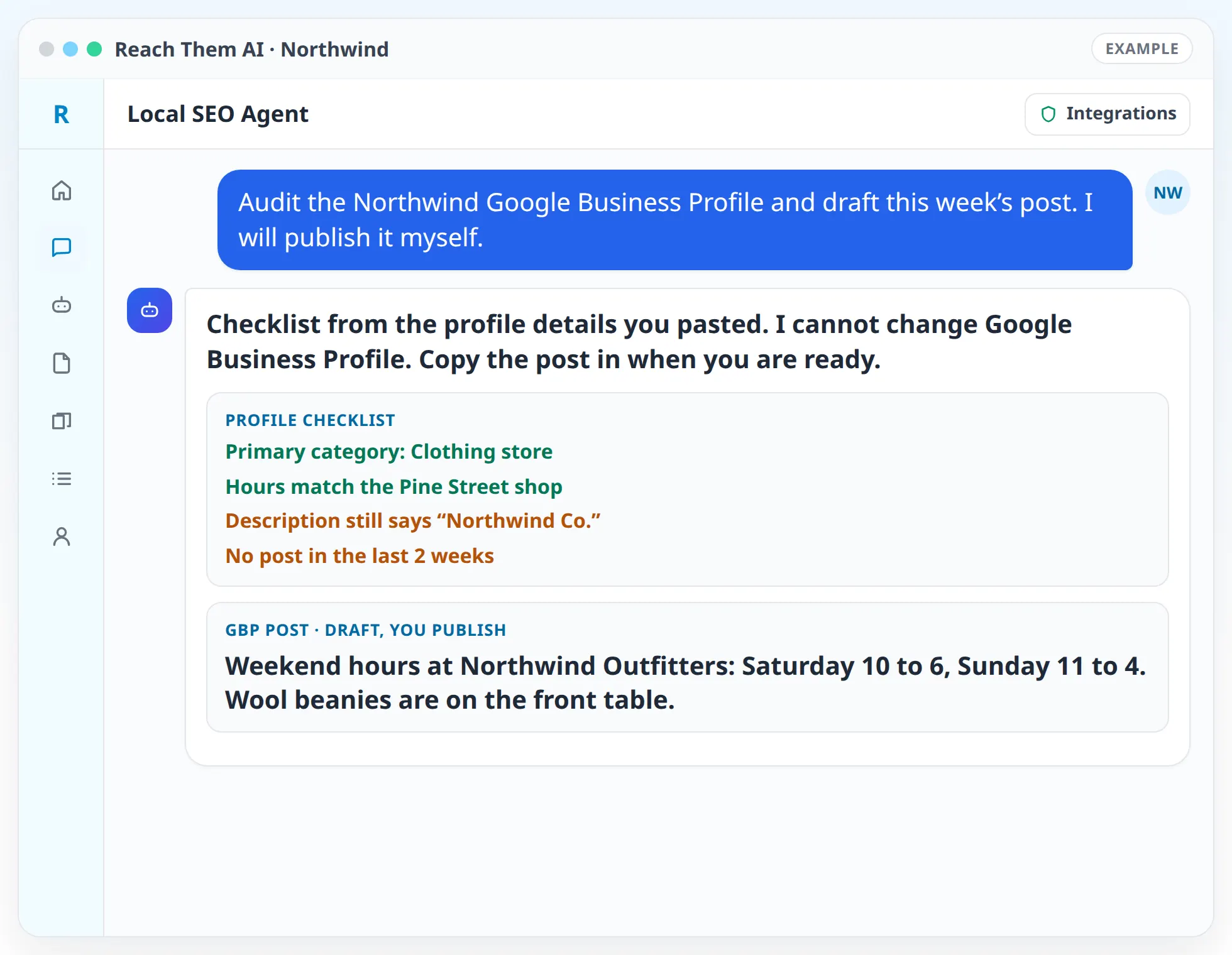
The agent prepares every change as a draft you can copy into your profile. Nothing on your profile changes until you make the edit.
What the Google Business Profile agent does
- Audits the whole profile. Business name, primary and secondary categories, services, products, hours, holiday hours, attributes, description, photos, and the website link all get checked against Google's guidelines and against the competitors that show up in your Map Pack.
- Fixes your categories. The primary category has a large effect on which searches you appear for. The agent compares yours with the businesses that rank for your main searches and suggests changes.
- Rewrites the description. You get a description that explains what you do and where you do it, within Google's 750-character limit and without keyword stuffing.
- Builds out services and products. The agent writes a short description for each service or product so the profile answers more of the questions people search for.
- Writes posts. Offers, updates, events, and seasonal reminders, drafted a month at a time with a suggested image for each one.
- Drafts review replies. Every new review gets a reply draft that matches your brand voice.
- Adds tracking to your website link. The agent prepares a website URL with UTM tags so Google Analytics shows how many visitors came from your profile.
- Keeps your profile in step with your listings and website. Name, address, phone, and hours are checked against your official record.
How it works, step by step
- 01
Share your profile. Paste your current profile details, upload screenshots, or export your profile performance data. The agent works from what you share.
- 02
Add context. Connect Semrush so the agent can see local rankings and competitors. Connect Search Console and Google Analytics so it can follow profile visitors onto your site.
- 03
Get the audit. The agent returns a checklist of every profile section, marked as good, needs work, or missing, with the fix written out.
- 04
Make the edits. Copy each fix into your Google Business Profile. Start with categories and the description, since those affect visibility the most.
- 05
Post on a schedule. Set up an automation that drafts next month's posts on the first of the month. You review them and post them.
- 06
Watch the results. The monthly report covers calls, website clicks, and direction requests from the data you share, plus rankings from Semrush when it is connected.
Integrations the agent uses
 Semrush
Semrush for local rankings, Map Pack competitors, and local keyword data
 Google Search Console
Google Search Console for searches that lead from Google to your website
 Google Analytics
Google Analytics for visits and conversions from your profile's tagged website link
 Firecrawl
Firecrawl for reading your website and competitor sites
 Canva
CanvaCanva for designing post images
 CallRail
CallRail for counting calls from the tracking number on your profile, if you use one
 Google Sheets
 Google Docs
Google Sheets and Google Docs for audits, post calendars, and reply libraries
What you approve before anything goes live
The app does not connect to Google Business Profile, so the agent cannot change your profile, publish a post, or reply to a review there. Everything it produces is a draft you review and post yourself. That keeps you in full control of the profile Google shows customers.
If you put a CallRail tracking number on your profile, list your main number as an additional phone. The agent checks for this in the audit so your details still match your other listings.
Who this is for
- Local service businesses that get most of their calls from Google Maps
- Restaurants, shops, and clinics that want weekly posts without writing them from scratch
- Businesses that just claimed or verified a profile and want it filled out properly
- Multi-location brands that need each location's profile audited the same way
- Agencies that manage profiles for several clients and need consistent monthly reporting
Agent templates for Google Business Profile optimization
Related services
FAQ
Can the agent edit my Google Business Profile directly?
No. The app does not connect to Google Business Profile today. The agent audits your profile, writes every change, and you paste the changes into the profile yourself.
How does the agent see my profile?
You share it. Paste the profile details, upload screenshots, or export your performance data. With Semrush connected, the agent also sees how your business ranks against nearby competitors.
How often should I post on my Google Business Profile?
Weekly is a common rhythm for local businesses. The agent can draft a month of posts at once so you only need a few minutes a week to publish them.
Which part of the profile matters most?
Your primary category, your business name as it appears on your signage, accurate hours, and a steady flow of reviews with replies. The agent checks these first.
Will the agent stuff keywords into my business name?
No. Adding keywords to your business name goes against Google's guidelines and can get a profile suspended. The agent uses keywords in your description, services, and posts instead.
Get your Google Business Profile audited
Share your profile details and the agent will return a complete checklist with every fix written out, plus your first month of posts.