AI reputation management that helps you answer every review well
Your reputation is spread across Google reviews, Facebook comments, review sites, and whatever shows up when someone searches your business name. Keeping up with all of it takes time most owners do not have. Reach Them AI gives you an AI reputation management agent that gathers what customers are saying, sorts it by urgency, and drafts thoughtful replies in your voice.
You post public replies yourself. The agent waits before it emails anyone.
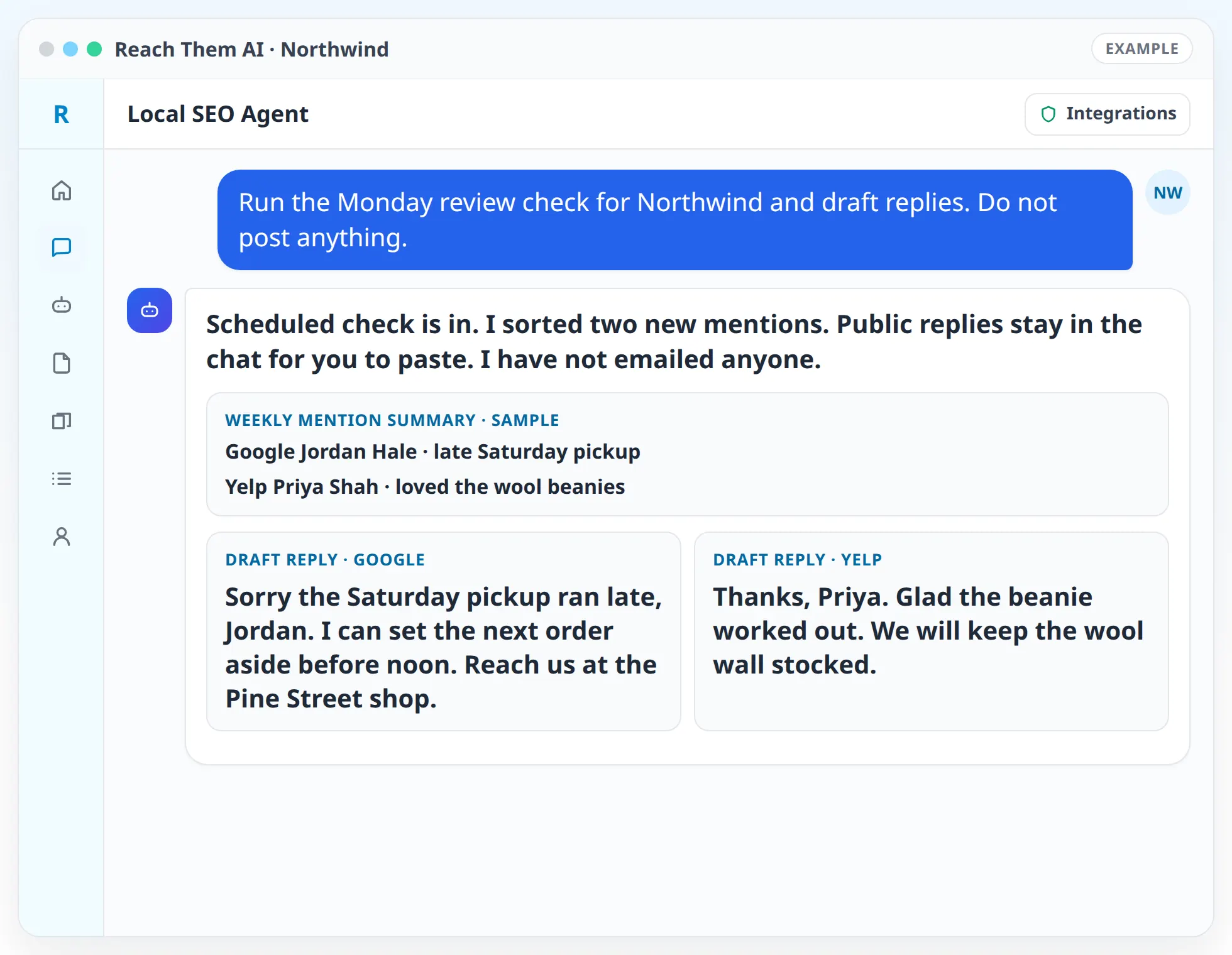
You decide what gets posted. The agent writes drafts and reports, and it does not publish anything on your behalf without your approval.
What the reputation management agent does
- Collects feedback from the places you point it to. Paste reviews, upload an export from your review platform, or connect your Facebook Page and Instagram account so the agent can read comments on your own posts.
- Checks the public web for your name. Using Firecrawl, the agent can search for your business name and read public pages that mention you, such as news articles, directory pages, and forum threads.
- Sorts everything by sentiment and urgency. Each item is marked positive, neutral, or negative, and anything that mentions safety, legal threats, or private details goes to the top.
- Drafts replies. Thank-you replies for happy customers, and calm, specific answers for unhappy ones that acknowledge the problem and offer a way to talk offline.
- Spots patterns. If several reviews mention slow callbacks or one location's parking, the agent points that out so you can fix the cause.
- Reviews your branded search results. With Semrush and Google Search Console connected, the agent looks at what ranks for your business name and which branded searches bring people to your site.
- Writes a monthly reputation report. New reviews, rating trend, recurring themes, and next steps, built only from data you shared or the agent pulled from a connected source.
How it works, step by step
- 01
Tell the agent where your reputation lives. List the review sites that matter for your industry and connect Facebook, Instagram, Firecrawl, Semrush, and Search Console where you use them.
- 02
Share recent feedback. Paste the latest reviews or upload an export. The agent reads them and builds a short summary of what customers praise and what they complain about.
- 03
Get a triage list. The agent sorts items into "reply today," "reply this week," and "no reply needed," with a draft attached to each one that needs a response.
- 04
Edit and approve. Change any draft you want. The agent rewrites on request and keeps your brand voice.
- 05
Post the replies. You post them on the review site. For comments on your own Facebook or Instagram posts, the agent can post the reply after you approve it, where the connected account allows replies.
- 06
Schedule a weekly check. Set up an automation that searches the public web for your business name each week and sends you a summary of anything new.
Integrations the agent uses
 Facebook Pages
 Instagram
Facebook Pages and Instagram for comments on your own posts
 Firecrawl
Firecrawl for searching and reading public web pages that mention your business
 Semrush
Semrush for branded search results and competitor comparisons
 Google Search Console
Google Search Console for branded queries that lead to your site
 Google Analytics
Google Analytics for traffic from review sites and directories
 Gmail
GmailGmail for following up privately with a customer after you approve the email
 Google Docs
 Google Drive
Google Docs and Google Drive for saving reports and reply libraries
What you approve before anything goes live
The agent writes the drafts and you publish them. You copy public review replies from the chat and post them yourself, because the app does not connect to Google Business Profile, Yelp, or other review sites. When a reply or a private follow-up email can go out through a connected account, the agent shows an approval card first and waits.
Scheduled reputation checks are read-only unless you turn on live actions for that automation. A weekly run will gather mentions and write a summary, and it will not reply to anyone on its own.
Handling negative reviews and problem posts
A bad review needs a reply that is short, specific, and calm. The agent drafts replies that thank the person, name the issue without arguing, and offer a direct way to sort it out. It avoids confirming private details, which matters for healthcare, legal, and financial businesses.
If a review looks like it breaks the platform's rules, for example spam, a review of the wrong business, or a post from someone who was never a customer, the agent explains which rule it may break and drafts the report text. You file the report with the platform. The agent cannot remove reviews, and no one can promise a platform will take one down.
Who this is for
- Local businesses that get reviews on several sites and want one place to read and answer them
- Multi-location brands that need replies that sound consistent across every location
- Regulated practices that need replies that protect client and patient privacy
- Agencies managing reputation for clients who want a weekly summary instead of a dashboard
- Owners dealing with a run of negative reviews who want a calm plan and good drafts
Agent templates for reputation management
- Explore the Local SEO Agent
- Social Media Content AgentComing soon
Related services
FAQ
Does the agent monitor reviews in real time?
No. It checks when you ask, or on a schedule you set, such as a weekly automation. Each check reads the sources you connected or shared and summarizes what is new since the last one.
Which sources can the agent read?
Reviews you paste or upload, comments on your own Facebook and Instagram posts once those accounts are connected, and public web pages Firecrawl can reach. Some review sites block automated reading, so for those you paste or export the reviews.
Can the agent remove a bad review?
No. It can tell you whether a review may break the platform's rules and draft the report for you to submit. The platform decides whether to remove it.
Will replies sound like a bot?
The agent writes from your brand profile and runs each draft through a humanizing pass that cuts stock phrases. You can edit any draft or paste in replies you like so the agent matches them.
Can I see trends over time?
Yes. The monthly report compares themes, rating, and review volume with the previous month, using only the data you shared or the agent pulled from a connected source.
See what customers are saying about you
Share your latest reviews and connect your social accounts. The agent will sort them, flag what needs attention, and draft the replies.