Local listing management with an AI agent that finds every mismatch
Customers find local businesses through Google, Apple Maps, Bing, Yelp, Facebook, and industry directories. When those listings show different phone numbers, old addresses, or two versions of the same business, people call the wrong number and search engines trust your details less. Reach Them AI gives you a local listing management agent that audits your listings, lines up every name, address, and phone number against your official record, and hands you a cleanup plan in priority order.
The agent prepares the text. You or your listing provider make the change.
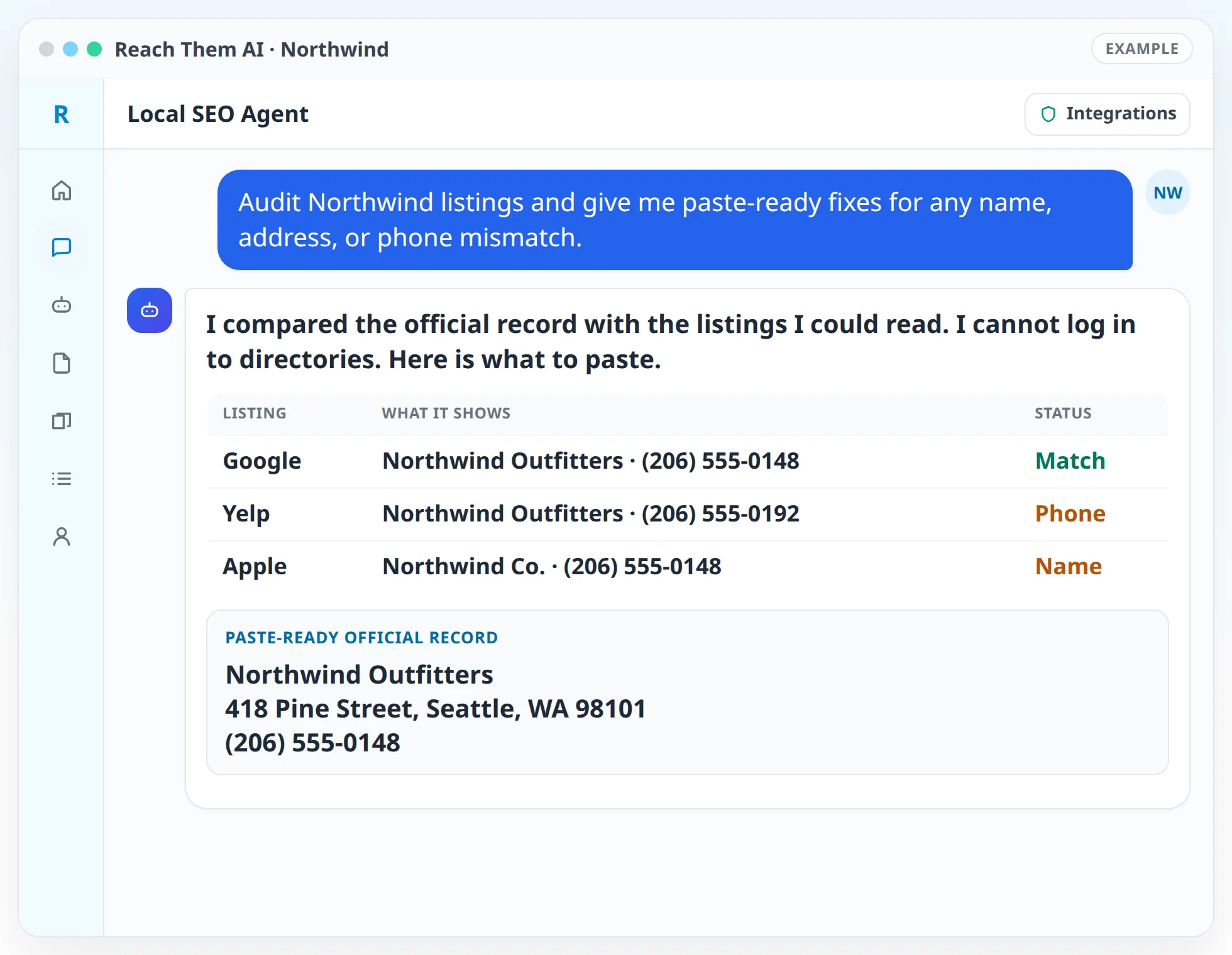
The agent prepares the data and the copy. You or your listing provider make the updates, so nothing changes on a directory without you.
What the local listing agent does
- Builds your official business record. Name, address, phone, website, hours, categories, and service areas, agreed with you once and used everywhere after that.
- Audits your existing listings. The agent compares each listing you share or it can read on the public web with the official record and marks every mismatch.
- Creates a NAP consistency matrix. One table shows each directory, what it lists for your name, address, and phone, and whether it matches. Duplicates and closed locations are called out.
- Picks the directories that matter for your industry. A plumber, a dentist, and a restaurant need different sites. The agent ranks directories by how much they matter for your type of business.
- Orders the cleanup by impact. Fixes to the listings customers see most come first. Small directories come later.
- Writes listing content. Business descriptions, service lists, and category suggestions for each platform, written to fit that platform's length limits.
- Checks your own website. Your site should match your listings too. The agent reads your contact and location pages and drafts LocalBusiness schema markup for your developer or for the Wix Web Developer Agent.
How it works, step by step
- 01
Confirm your official details. The agent asks for your business information and any past names, old addresses, or tracking phone numbers that might still be out there.
- 02
Gather the current listings. Upload an export from your listing tool, share the Semrush listing data your plan includes, paste links to your listings, or let the agent search the public web with Firecrawl.
- 03
Review the audit. You get the consistency matrix and a short list of the problems that cost you the most, such as a wrong phone number on a major map app.
- 04
Approve the plan. The agent turns the audit into a cleanup queue with the exact text to enter on each site.
- 05
Make the updates. You or your listing service work through the queue. For new listings, the agent gives you the full profile copy, ready to paste.
- 06
Re-check. A scheduled automation can repeat the audit each month and tell you which fixes have shown up and which have not.
Creating new listings
When a directory is missing your business, the agent prepares everything you need to create the listing: the official details, a description sized for that site, the best-fit categories, a list of photos to upload, and your hours and service area. Creating the account and verifying ownership is done by you, because most directories send a code by phone, mail, or email to confirm you own the business.
Integrations the agent uses
 Semrush
Semrush for local data and any listing information your Semrush plan includes
 Firecrawl
Firecrawl for reading public listing pages and your own website
 Google Search Console
Google Search Console for checking how your location pages perform in search
 Google Analytics
Google Analytics for traffic that arrives from directories
 Google Sheets
Google Sheets for keeping the consistency matrix and cleanup queue in a shared spreadsheet
 Wix
WixWix for site contact pages and location content when your site runs on Wix
What you approve before anything goes live
The listing agent does not log in to directories or submit data to data aggregators. Every change is made by you or your listing provider, using the text the agent prepared. If you ask the agent to change something on your own website, such as updating a phone number on a Wix page, it shows you the change and waits for your confirmation.
Monthly re-checks run on a schedule and only read and report.
Who this is for
- Businesses that moved, changed phone numbers, or rebranded and still see old details online
- Multi-location brands that need one official record per location
- Service-area businesses that do not show a street address and need consistent service area wording
- Agencies that want a repeatable listing audit for each new client
- Anyone who already pays for a listing distribution tool and wants clean data to load into it
Agent templates for local listings
Related services
FAQ
Does the agent push my information to directories automatically?
No. It audits your listings, writes the corrected details and listing copy, and orders the fixes by impact. You or your listing provider make the updates on each site.
What is NAP consistency?
NAP stands for name, address, and phone number. Search engines and customers trust a business more when those details match everywhere it is listed. The agent checks each listing against your official record and marks every difference.
Can the agent find duplicate listings?
It flags likely duplicates it finds in the listings you share and on public pages it can read, such as two entries with slightly different names at the same address. Merging or removing them is done through each directory's own process.
Which directories should my business be on?
It depends on your industry and location. The agent starts with the major map and search platforms, then adds the directories that matter for your type of business, and explains why each one is on the list.
How often should listings be checked?
Monthly is a good default. A scheduled automation can rerun the audit and send you only what changed.
Find out where your listings disagree
Give the agent your official details and it will build a listing audit and a cleanup plan you can start on today.